Create function (Code-level)
This guide explains how developers create a function by defining its runtime environment, implementing execution logic, managing source code, and deploying function versions.
The focus of this guide is function implementation and lifecycle at the code level, rather than UI operations or job execution.
Which page do you want? This page specifies the code contract —
handler.py, the return shape each SDK expects,post_processing(), andrequirements.txt. For the five-step creation wizard in the interface — the screens, fields and navigation rules — see Create Function. That page is canonical for everything you do through the UI.
1. Function Concept
A function represents a reusable execution unit that encapsulates quantum or hybrid computation logic.
Each function consists of:
- A runtime template (framework and execution environment)
- Source code implementing the function logic
- One or more versions
- Deployment artifacts that make the function available for invocation
2. Defining Function Metadata
When creating a function, the following metadata is required.
Function Name
The function name uniquely identifies the function within a project, and is validated when the function is created. The naming rules are specified once, on Create Function → Function Name. A name that breaks them, or that already exists in the project, fails creation.
Description (Optional)
An optional description can be provided to explain the function’s purpose and intended use.
3. Selecting a Runtime Template
A runtime template defines:
- The execution environment
- The supported quantum or classical framework
- The initial project structure
Examples of supported templates include Qiskit, Braket, CUDA Quantum and PennyLane.
For the complete, current list of supported SDKs and their versions, see Create Function → Available SDKs. That page is the canonical reference; the examples above are illustrative only.
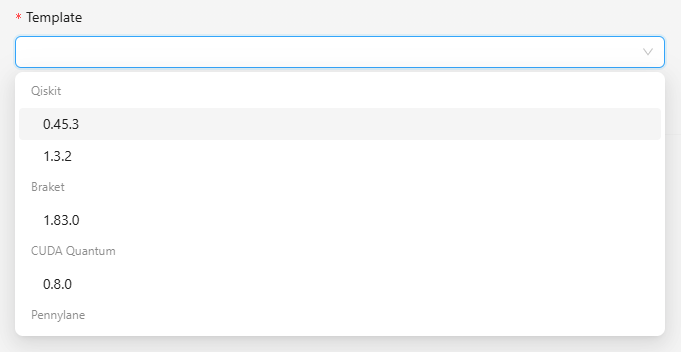
Each template provides:
- A default
handler.pyimplementation - A compatible runtime environment
- Framework-specific helper libraries
Important: The runtime template is immutable. Once the function is created, the template cannot be changed.
4. Function Versions
Each function is initialized with a default version (for example, v1).
A version represents:
- A specific snapshot of the function’s source code
- A deployable unit that can be independently invoked
Multiple versions allow developers to:
- Iterate safely on implementation
- Test new logic without affecting stable versions
- Roll back to previous implementations if needed
5. Implementing Function Logic
Core Entry Point: handler.py
The handler.py file contains the primary execution logic of the function.
The function must expose a processing(invocation_input) method.
def processing(invocation_input):
    # implement computation logic here
    return result
invocation_input
- Represents the input payload provided at invocation time
- Typically contains parameters required for computation or circuit construction
Typical responsibilities of handler.py include:
- Building quantum circuits
- Preparing execution logic
- Validating inputs
- Returning execution results
Dependency Management: requirements.txt
The requirements.txt file specifies all Python dependencies required by the function.
- Libraries listed here are installed automatically during deployment
- Missing dependencies may cause deployment or runtime failures
Example:
qiskit
numpy
Processing Function Return Contract
The processing() function is responsible for initializing and constructing the computation logic only.
It MUST NOT:
- Execute the circuit on a backend
- Submit jobs directly
- Bind to a specific execution device
- Perform SDK-level execution calls
The execution engine handles backend selection, device configuration, and job submission. The function must return a standardized object depending on the selected runtime template.
SDK-Specific Return Requirements
- Amazon Braket (braket)
- Required Return Object:
braket.circuits.circuit.Circuit - Description: The function must return a Braket Circuit object with applied quantum gates. You can explicitly define measurement instructions, or rely on the engine's default execution flow to measure all qubits.
- Example:
from braket.circuits.circuit import Circuit

def processing(invocation_input):
    # Initialize Braket circuit
    circuit = Circuit()

    # Apply quantum gates
    circuit.h(0).cnot(0, 1)

    # MANDATORY: Return the Circuit object
    return circuit
- IBM Qiskit (qiskit)
- Required Return Object:
qiskit.QuantumCircuit - Description: The function must return a Qiskit
QuantumCircuitobject. This circuit should typically include classical registers andmeasureinstructions if the problem requires retrieving probability distributions or state counts. - Example:
from qiskit import QuantumCircuit

def processing(invocation_input):
    # Initialize circuit with 2 qubits and 2 classical bits
    qc = QuantumCircuit(2, 2)

    # Add gates and measurements
    qc.h(0)
    qc.cx(0, 1)
    qc.measure([0, 1], [0, 1])

    # MANDATORY: Return the QuantumCircuit object
    return qc
- PennyLane (pennylane)
- Required Return Object: A Python function containing PennyLane operations and returning PennyLane measurement objects (e.g.,
qml.probs(),qml.expval(),qml.sample()). - Description: Unlike other SDKs that return an instantiated object, PennyLane's standard design within this architecture requires returning the unexecuted function itself. It should not be wrapped with the
@qml.qnodedecorator yet, as the QNode requires Device configuration, which is handled by the downstream execution engine. - Example:
import pennylane as qml

def processing(invocation_input):
    # Define the circuit as a nested function
    def simple_circuit():

        # Apply gate
        qml.Hadamard(wires=0)

        # Return standard PennyLane measurements
        return qml.probs(wires=0), qml.probs()

    # MANDATORY: Return the FUNCTION itself (do not call it)
    return simple_circuit
- Rigetti PyQuil (pyquil)
- Required Return Object:
pyquil.quil.Program - Description: You must initialize a Program object, declare memory regions/registers (like
ro) to store classical readouts, apply quantum gates, and addMEASUREinstructions. - Example:
from pyquil import Program
from pyquil.gates import X, MEASURE

def processing(invocation_input):
    p = Program()

    # Declare classical memory for readout
    ro = p.declare('ro', 'BIT', 1)

    # Apply gates
    p += X(0)
    p += X(1)
    p += X(2)

    # Add measurement instruction
    p += MEASURE(0, ro[0])

    # MANDATORY: Return the Program object
    return p
- D-Wave (pyqubo / dimod)
- Required Return Object:
dimod.BinaryQuadraticModel(BQM) - Description: For D-Wave (Quantum Annealing), instead of a gate-based circuit, a mathematical model is constructed. The
processingfunction uses PyQUBO (or equivalent) to define the objective function (Hamiltonian) and constraints. It must be compiled into a BQM object before being returned. *Example:
from pyqubo import Array, Constraint

def processing(invocation_input):
    # Initialize binary variables
    x = Array.create('x', shape=3, vartype='BINARY')

    # Objective function and constraint
    H = (x[0] + x[1] - 1)**2 + (x[1] + x[2] - 1)**2
    constraint = Constraint(x[0] * x[1], label='constraint')
    model = H + constraint

    # Compile to BQM
    bqm = model.compile().to_bqm()

    # MANDATORY: Return the BQM object
    return bqm
- Microsoft Q# (qsharp)
- Required Return Object: Compiled Q# Operation (output of
qsharp.compile()) - Description: The function must initialize the Q# environment, specifying the project root and target profile. It should then compile the target Q# operation using the provided invocation_input and return the compiled object. This allows the execution engine to seamlessly execute the Q# code on the desired backend.
- Example:
import os
import qsharp

def processing(invocation_input):
    # Optional: Debugging the execution path
    print("Current working directory:", os.getcwd())

    # Initialize the Q# workspace and target profile
    qsharp.init(project_root='./function', target_profile=qsharp.TargetProfile.Base)

    # MANDATORY: Return the compiled Q# operation
    return qsharp.compile(f"Main.RandomNBits({invocation_input})")
Updated Return Object Summary Table
| SDK Name | Standard Import | Required Return Type |
|---|---|---|
| Braket | from braket.circuits.circuit import Circuit | Circuit |
| Qiskit | from qiskit import QuantumCircuit | QuantumCircuit |
| PennyLane | import pennylane as qml | function (callable containing qml operations) |
| PyQuil | from pyquil import Program | Program |
| D-Wave | from pyqubo import Array | dimod.BinaryQuadraticModel (BQM) |
| Q# | import qsharp | Compiled Q# Operation (via qsharp.compile()) |
Result Transformation: post_processing(job_result)
After the execution engine completes a job, the platform generates a job_result object containing the raw execution output.
Each function must define a post_processing(job_result) method inside handler.py.
This method is responsible for transforming the raw execution result into the final response returned to the caller.
Function Signature
def post_processing(job_result):
    return transformed_output
Input
job_result: The completed execution result returned by the execution engine.
Output
- Any serializable Python object (e.g., dict, list, string, number).
If post_processing is not defined, function deployment will fail.
Example 1 – Calculate Measurement Probabilities
Use case: Convert raw measurement counts into a normalized probability distribution.
def post_processing(job_result):
    counts = job_result.get_counts()
    total_shots = sum(counts.values())

    probabilities = {
        state: count / total_shots
        for state, count in counts.items()
    }

    return probabilities
Example 2 – Filter Specific Quantum State
Use case: Extract the success rate of a target quantum state.
def post_processing(job_result):
    counts = job_result.get_counts()
    target_state = "11"

    success_rate = counts.get(target_state, 0) / sum(counts.values())

    return f"{target_state}: {success_rate * 100:.2f}%"
Example 3 – Return Full Execution Result
Use case: Preserve the complete raw execution output for debugging or advanced analysis.
def post_processing(job_result):
    return job_result
6. Modifying and Extending Source Code
Developers may customize the function implementation in several ways:
- Edit the default template code
- Add additional Python modules (
*.py) - Upload custom source files to replace or extend existing logic
The platform supports both:
- Direct code editing via the built-in editor
- Uploading local Python files
All source code changes are tracked through function versioning.
7. Saving Changes and Version Creation
Whenever source code is modified:
- Saving the changes creates a new function version
- Each version preserves a complete snapshot of the source code
- Versions can be selected independently for deployment
This mechanism enables controlled iteration and experimentation.
8. Deploying a Function Version
Deployment packages a specific function version into an executable artifact.
During deployment:
- Dependencies from
requirements.txtare installed - The source code is validated
- The function version becomes available for invocation
After successful deployment:
- The function can be invoked via SDK or API
- The function version can be used to create execution jobs
9. Key Constraints and Best Practices
- Runtime templates cannot be changed after function creation
- Each deployment corresponds to a specific function version
- Declare all required dependencies before deployment
- Use versioning to isolate experimental changes from stable releases
10. Next Steps
After deploying a function, developers typically proceed to:
- Invoke the function programmatically using SDK or API
- Create and manage execution jobs based on the deployed function
- Monitor execution results and logs
Refer to the following guides for more details:
- Job Invocation — the full invocation procedure
- Invoke function — how
invocation_inputandpost_processing()behave at invocation time - Managing and Tracking Job Results — reading and archiving results