請求アカウント管理
請求アカウント管理では、ユーザーおよび組織が支払い方法を管理し、請求責任を共有し、Quapp プラットフォーム内のプロジェクト全体で請求アカウントの利用方法を制御することができます。
本セクションでは、請求アカウントの仕組み、共有方法、ならびに請求アカウントの状態がユーザー権限およびプラットフォーム機能にどのような影響を与えるかについて説明します。
1. 請求アカウントの概要
請求アカウントは、Quapp 上の有料サービスの支払いに使用される支払い主体を表します。対象となる有料サービスには、以下が含まれます。
- 有料 SDK
- 有料デバイスおよびシミュレーター
- プレミアムサブスクリプション
- グループプロジェクト
各請求アカウントは、以下のような設定が可能です。
- ユーザーが所有する
- 他のユーザーと共有する
- 1 つ以上のプロジェクトに割り当てる
- デフォルトの請求アカウントとして設定する
利用可能な機能は、請求アカウントの状態によって異なります。
請求アカウントの状態は、支払い設定および取引履歴に基づいて決定されます。
2. 請求アカウント一覧
請求アカウント一覧には、ユーザー自身が所有している請求アカウント、または アクセス権を持つすべての請求アカウント が表示されます。
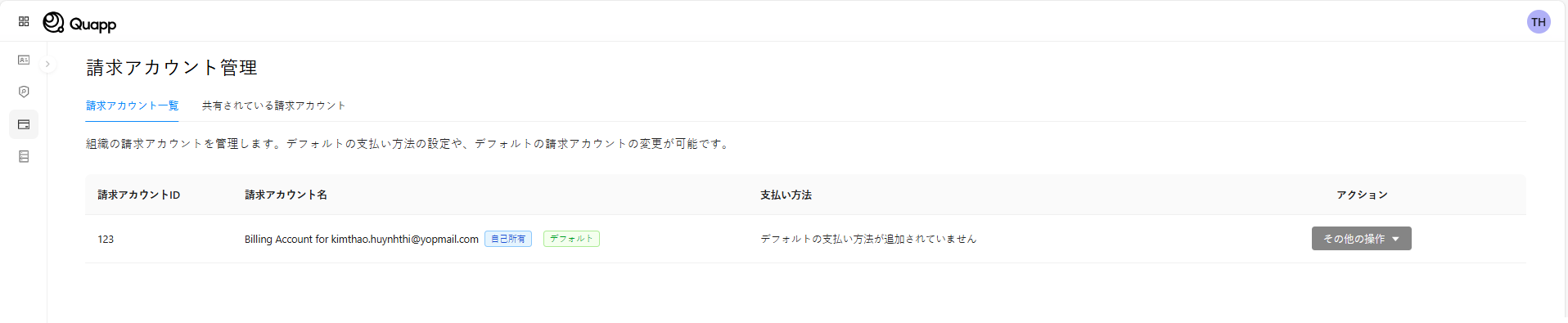
Quapp では、各請求アカウントについて以下の情報が表示されます。
- 請求アカウント ID
- 請求アカウント名
- 所有ステータス(所有者 / 共有)
- デフォルトの支払い方法
- デフォルト請求アカウントの識別表示
- 利用可能な操作
利用可能な操作
ユーザーのロールおよび請求アカウントの状態に応じて、以下の操作を行うことができます。
- 請求アカウントをデフォルトの請求アカウントとして設定します。
- 請求アカウントを他のユーザーと共有します。
- 今後作成されるプロジェクトのデフォルト請求アカウントとして設定します。
デフォルトの請求アカウントは、新しいプロジェクトを作成する際に自動的に選択されます。
ただし、プロジェクト作成時に別の請求アカウントが明示的に選択された場合は、その設定が優先されます。
3. 請求アカウントの共有
請求アカウントは、他のユーザーと共有することで、共同利用および 支払い管理の一元化 を行うことができます。
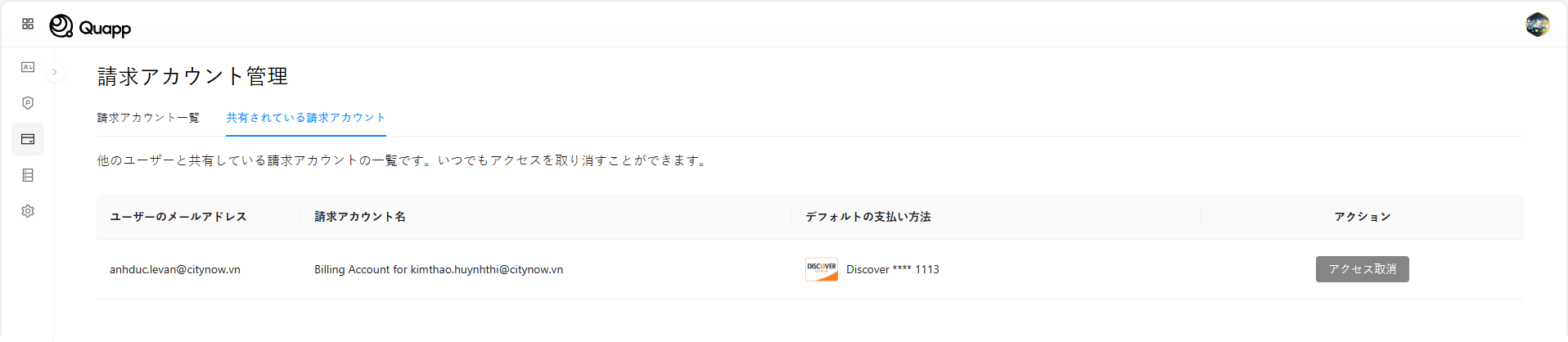
共有時の利用権限
請求アカウントを共有すると、共有先ユーザーは以下の操作を行うことができます。
- 対象となるプロジェクトおよび有料サービスで請求アカウントを使用します。
- 共有された請求アカウントを自身のデフォルト請求アカウントとして設定します。
- デフォルトとして設定した場合、新しいプロジェクト作成時に自動的に当該請求アカウントが使用されます。
アクセス管理
- 請求アカウントを共有またはアクセスを取り消すことができるのは、請求アカウントの所有者のみです。
- アクセスはいつでも取り消すことができます。
- 取り消しは 即時に反映 され、元に戻すことはできません。
⚠️ 注意
アクセスが取り消されたユーザーは、新しいプロジェクトの作成や有料操作において、当該請求アカウントを使用できなくなります。
4. 請求アカウントの状態
Quapp 上の各請求アカウントは、支払い準備状況および 取引履歴 を反映した特定の状態で運用されます。
請求アカウントの状態は、プラットフォーム上での利用可否や機能制限に影響します。
| 状態 | 説明 | システムステータス |
|---|---|---|
| 支払い方法未設定 | 請求アカウントは存在しますが、デフォルトの支払い方法が設定されていません。 | NO_PAYMENT_METHOD |
| 支払い方法設定済み | デフォルトの支払い方法は追加されていますが、まだ成功した支払い取引がありません。 | PAYMENT_METHOD_ADDED |
| 有効な請求アカウント | デフォルトの支払い方法が設定されており、少なくとも 1 件の支払いが正常に完了しています。 | ACTIVE_BILLING_ACCOUNT |
| 支払い失敗 | 過去に正常な支払い履歴がありますが、直近の支払いが失敗しています。 | PAYMENT_FAILED |
| 契約銀行振込 | 契約に基づく銀行振込モデルで運用されており、デフォルトの支払い方法は不要です。 | CONTRACT_BANK_TRANSFER |
請求アカウントの状態は 継続的に評価 され、支払いイベント(支払い成功・失敗、設定変更など)に応じて自動的に変更される場合があります。
5. 請求アカウント状態に基づく機能権限
請求アカウントの状態によって、プラットフォーム上でユーザーが利用できる機能が決まります。
以下の表は、請求アカウント状態ごとのユーザー機能の可否を示しています。
| ユーザー機能 | 支払い方法未設定 | 支払い失敗 | 支払い方法設定済み | 有効な請求アカウント | 契約銀行振込 |
|---|---|---|---|---|---|
| 個人プロジェクトの作成 | ✅ | ✅ | ✅ | ✅ | ✅ |
| グループプロジェクトの作成 | ❌ | ❌ | ❌ | ✅ | ✅ |
| 請求アカウントをデフォルトに設定 | ❌ | ✅ | ✅ | ✅ | ✅ |
| 請求アカウントの共有 | ❌ | ❌ | ❌ | ✅ | 非対応 |
| 他ユーザー向けプレミアム購入 | ❌ | ❌ | ❌ | ✅ | 非対応 |
凡例 ✅ 利用可能 ❌ 利用不可
重要事項
グループプロジェクトを作成するには、
有効な請求アカウント または 契約銀行振込 の状態が必要です。
請求アカウントの共有は、支払い成功履歴のある請求アカウントのみが対象となります。
契約ベースの請求アカウントは、エンタープライズ契約に基づいて管理されており、
請求アカウントの共有および他ユーザーへのプレミアム付与はサポートされていません。
6. 主要なルールおよび動作
- ユーザーは複数の請求アカウントを所有または利用できますが、同時にデフォルトとして設定できるのは 1 つのみです。
- デフォルトの請求アカウントは、新しいプロジェクト作成時に自動的に適用されます。
- 共有ユーザーは、共有された請求アカウントを自身のデフォルト請求アカウントとして選択できます。
- 請求アカウントの状態が変更されると、利用可能な機能に即時影響する場合があります。
- 無料サービスおよびクォータ更新は、請求アカウントの状態による制限を受けません。
7. 運用上の注意事項
- 支払い失敗状態の請求アカウントでは、警告表示や一部機能の制限が発生する可能性があります。
- すでに請求アカウントを使用しているプロジェクトは、支払い問題が発生しても自動的に削除されることはありませんが、有料実行がブロックされる 場合があります。
- 今後のリリースでは、一時的な支払い失敗に対して、アラート通知や猶予期間が導入される可能性があります。