サブスクリプションのストレージ使用状況
本セクションでは、Quapp のサブスクリプション全体におけるストレージ使用量を簡単に確認できます。
シンプルで分かりやすく、透明性の高い設計となっており、どのリソースがどれだけ使用されているか、また現在のプランがご利用状況に適しているかを把握するのに役立ちます。
このページでできること
サブスクリプション使用状況では、以下の操作が可能です:
- ご自身または他のユーザー向けに購入したすべてのサブスクリプションを確認
- ストレージタイプ別の合計使用量を確認
- プロジェクトごとの詳細なストレージ使用量を表示
- Quapp のストレージ料金の仕組みを理解
本ページは閲覧専用です。請求や支払いなどの操作は不要で、状況の確認に特化しています。
対象ユーザー
サブスクリプション使用状況は、有効なサブスクリプションをお持ちのすべてのユーザーが利用できます:
- Standard
- Premium
- Enterprise
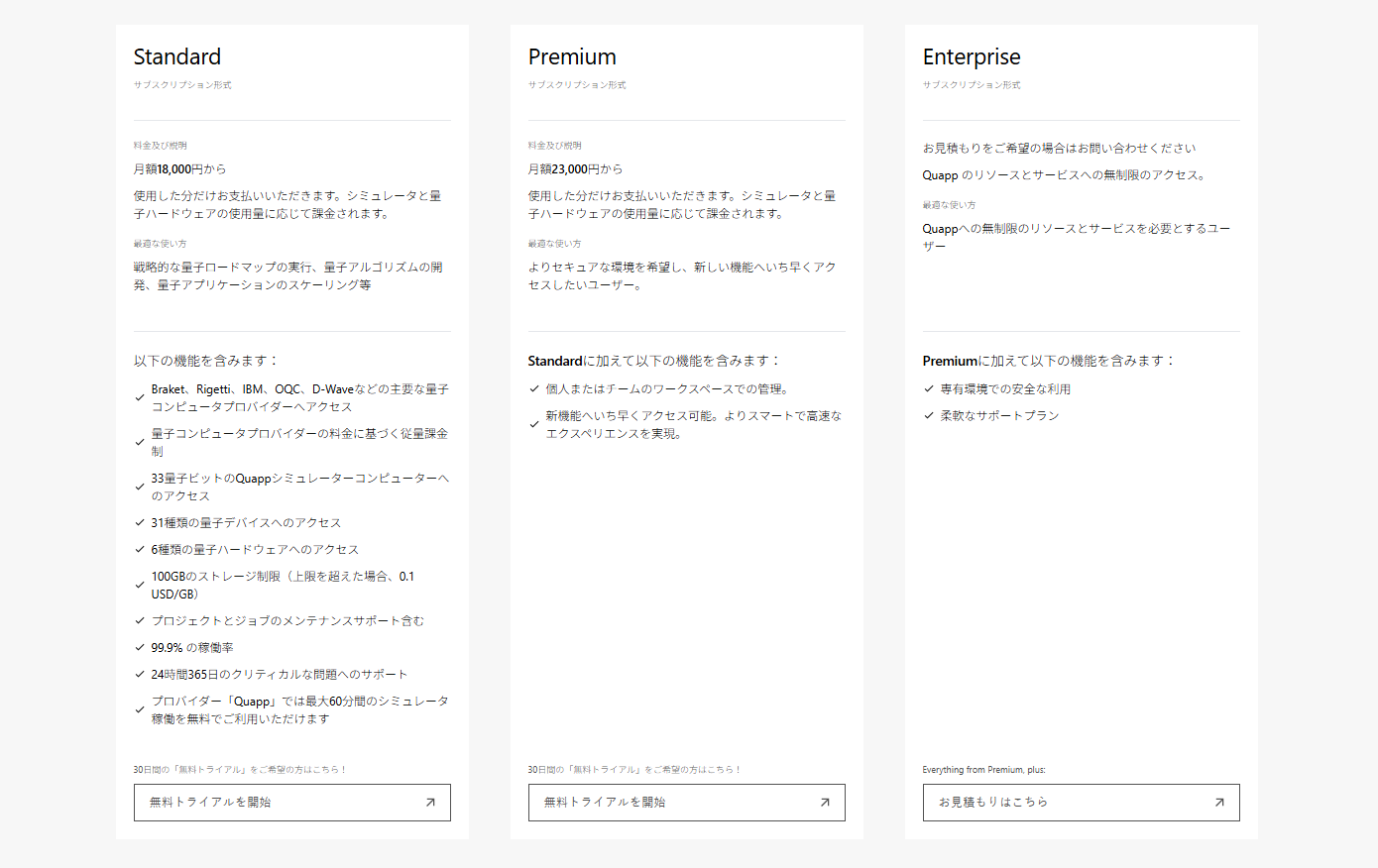
以下のサブスクリプションの使用状況を確認できます:
- ご自身が利用しているサブスクリプション
- 他のユーザーのために支払いを行っているサブスクリプション
ストレージタイプの説明
Quapp では、ストレージ使用量を以下の 3 種類に分類して管理しています:
- ソースコードストレージ – ファンクションのソースコードおよび関連ファイル
- ランタイムストレージ – ファンクション実行中に一時的に生成されるデータ
- アーティファクトストレージ – ジョブ実行によって生成される出力結果、ログ、成果物
合計は、上記 3 種類すべての使用量を合算した値です。

現在の使用状況
現在の使用状況ページでは、すべてのサブスクリプションの概要を確認できます。
表示される内容
各サブスクリプションごとに、以下の情報が表示されます:
- ユーザー – サブスクリプションに紐づくユーザー
- サブスクリプションプラン – Standard / Premium / Enterprise
- 次回の請求日 – 次に料金が請求される日
- ソースコードストレージ使用量 – ソースコードストレージの使用量
- ランタイムストレージ使用量 – ランタイムストレージの使用量
- アーティファクトストレージ使用量 – アーティファクトストレージの使用量
- 合計使用量 – プラン上限に対する合計使用量
複数のサブスクリプションを管理している場合、
この画面により使用量の比較や上限に近づいているサブスクリプションの把握が容易になります。
詳細の確認
詳細を選択すると、該当サブスクリプション内でのプロジェクト別ストレージ使用状況を確認できます。
リソース使用状況
リソース使用状況ページでは、選択したサブスクリプションについて
プロジェクト単位の詳細なストレージ使用量が表示されます。
表示される内容
合計使用量サマリー – サブスクリプション上限に対する現在の使用量
(例:
14.84 GB / 100 GB)プロジェクト一覧 – 当該サブスクリプション配下でストレージを使用しているすべてのプロジェクト
プロジェクト別使用量
- ソースコードストレージ (GB)
- ランタイムストレージ (GB)
- アーティファクトストレージ (GB)
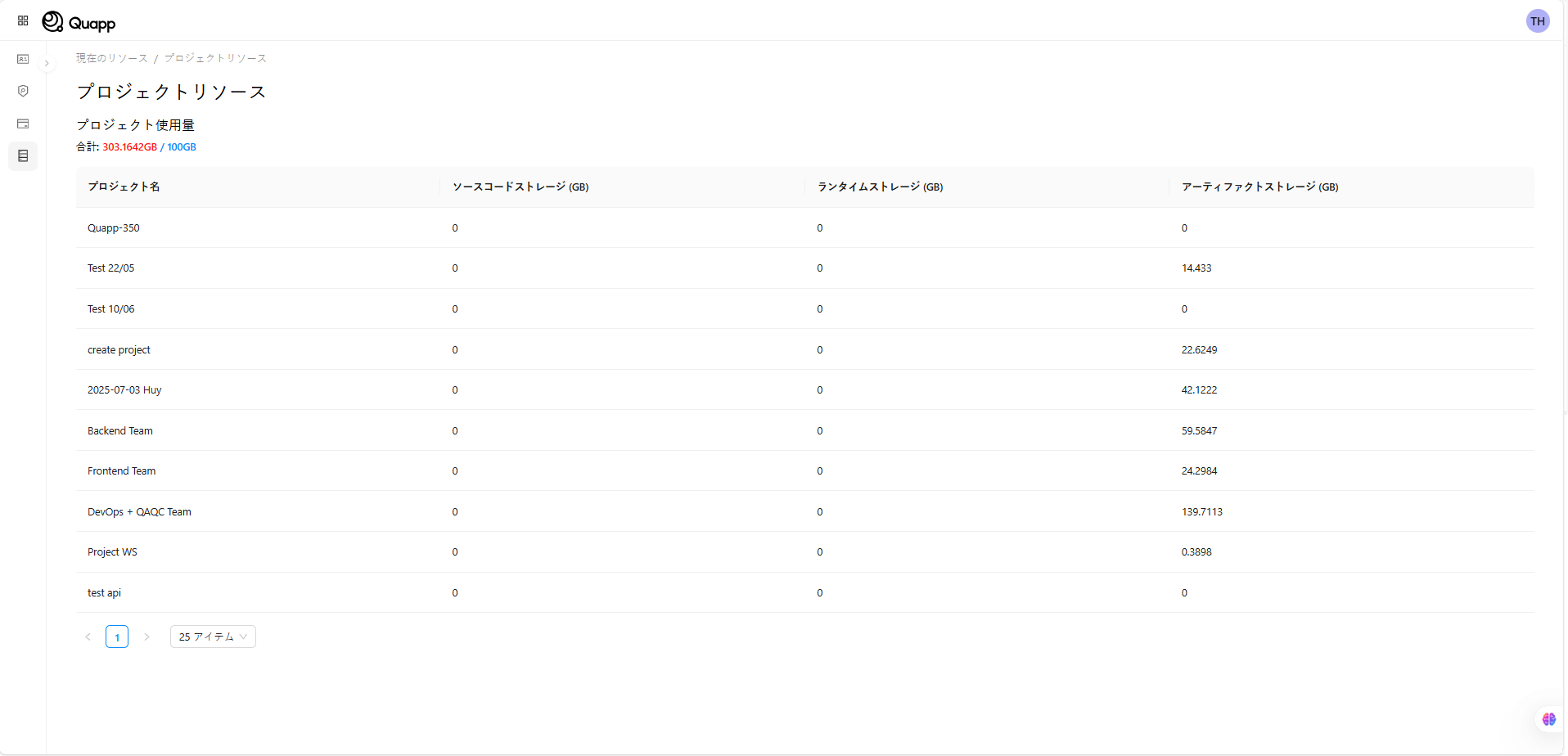
この画面は、以下のような場合に特に役立ちます:
- ストレージ消費量が多いプロジェクトの特定
- 不要なアーティファクトを整理するかどうかの判断
- 現在のサブスクリプションプランが適切かの検討
ストレージ料金ポリシー
Quapp では、すべてのサブスクリプションプランに共通のストレージポリシーを適用しています:
- 合計 100 GB まで無料
- 10 GB を超える分は 1 GB あたり $0.1
このポリシーは Standard / Premium / Enterprise すべてのプランで共通です。
注意事項・制限
- 使用量データは、システムがプラットフォームから取得するたびに更新されます。
- 表示できるのは、ご自身が支払者または利用者であるサブスクリプションのみです。
- プラン変更、支払い、請求書の確認などの操作は、請求セクションで行ってください。