APIアクセス・トークン
APIアクセス・トークンは、対話的なログインを必要とせず、Quapp ファンクションへ安全にプログラムからアクセスするための仕組みです。
外部システム、自動化ワークフロー、バックエンドサービス、CI/CDパイプラインなどへQuappを統合したい開発者向けに設計されています。
各アクセストークンは、特定のプロジェクトおよびファンクションに紐づけられており、制御可能かつ監査可能なアクセスを実現します。
APIアクセス・トークンとは
APIアクセス・トークンは、アプリケーションに以下の操作を許可する認証情報です。
- REST API経由でQuapp ファンクションを実行
- 量子ジョブをプログラムから送信
- ジョブの実行結果を取得
- Quappを外部システムと連携
トークンはプロジェクト単位・権限ベースで管理され、いつでも無効化できます。
トークンの所有者と権限
APIアクセス・トークンを作成できるのは プロジェクト管理者のみ です。
各トークンには以下が紐づきます。
- 単一のプロジェクト
- 1つ以上の指定されたファンクション
- (任意)有効期限
割り当てられた範囲外のファンクションにはアクセスできません。
この設計により、APIアクセスはQuapp UIと同一のセキュリティおよび権限モデルに従います。
アクセス・トークンの作成方法
アカウントにログインします。
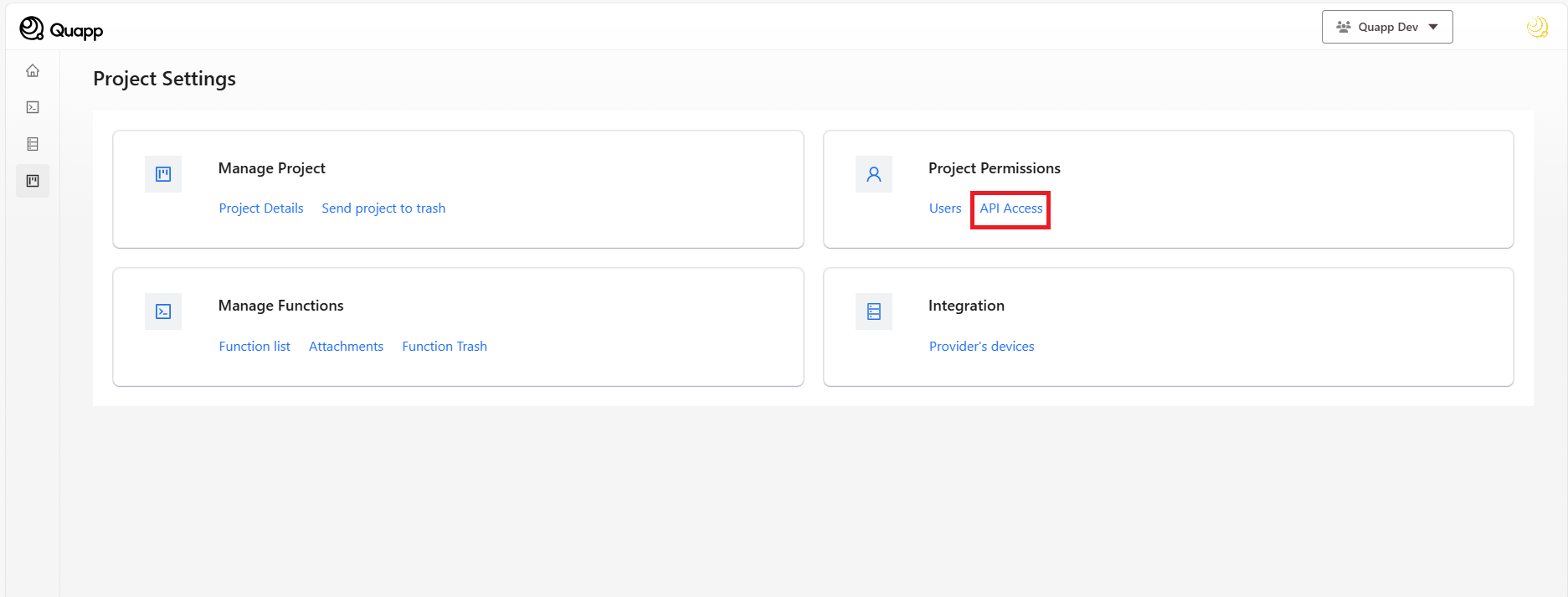
トークンを作成するプロジェクトを選択し、プロジェクト設定画面に移動します。
APIアクセスを選択します(※アカウントはプロジェクト管理者である必要があります)。
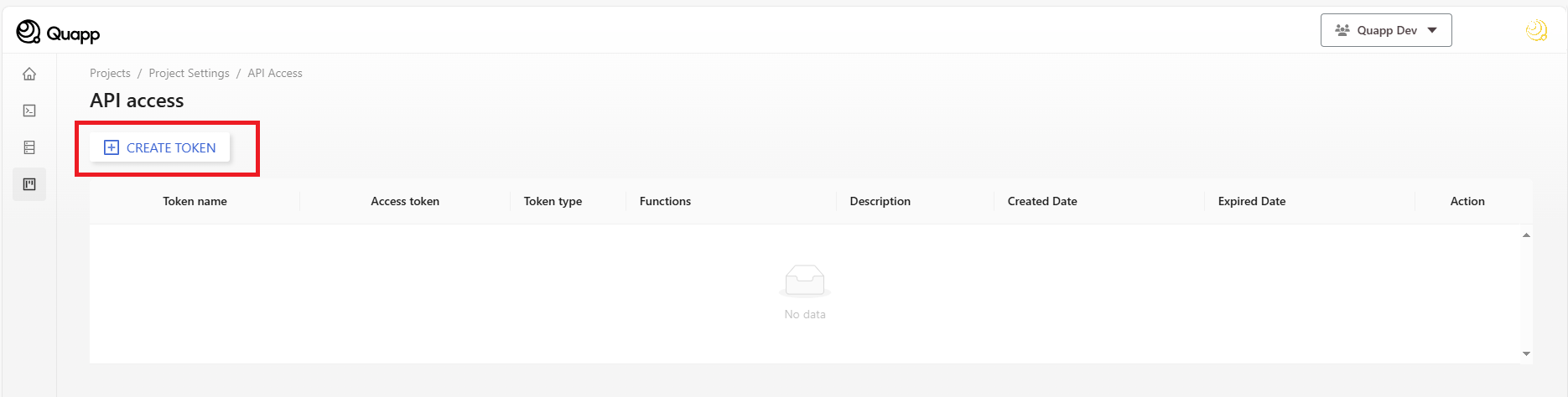
- APIアクセス画面で「トークンを作成」を選択します。
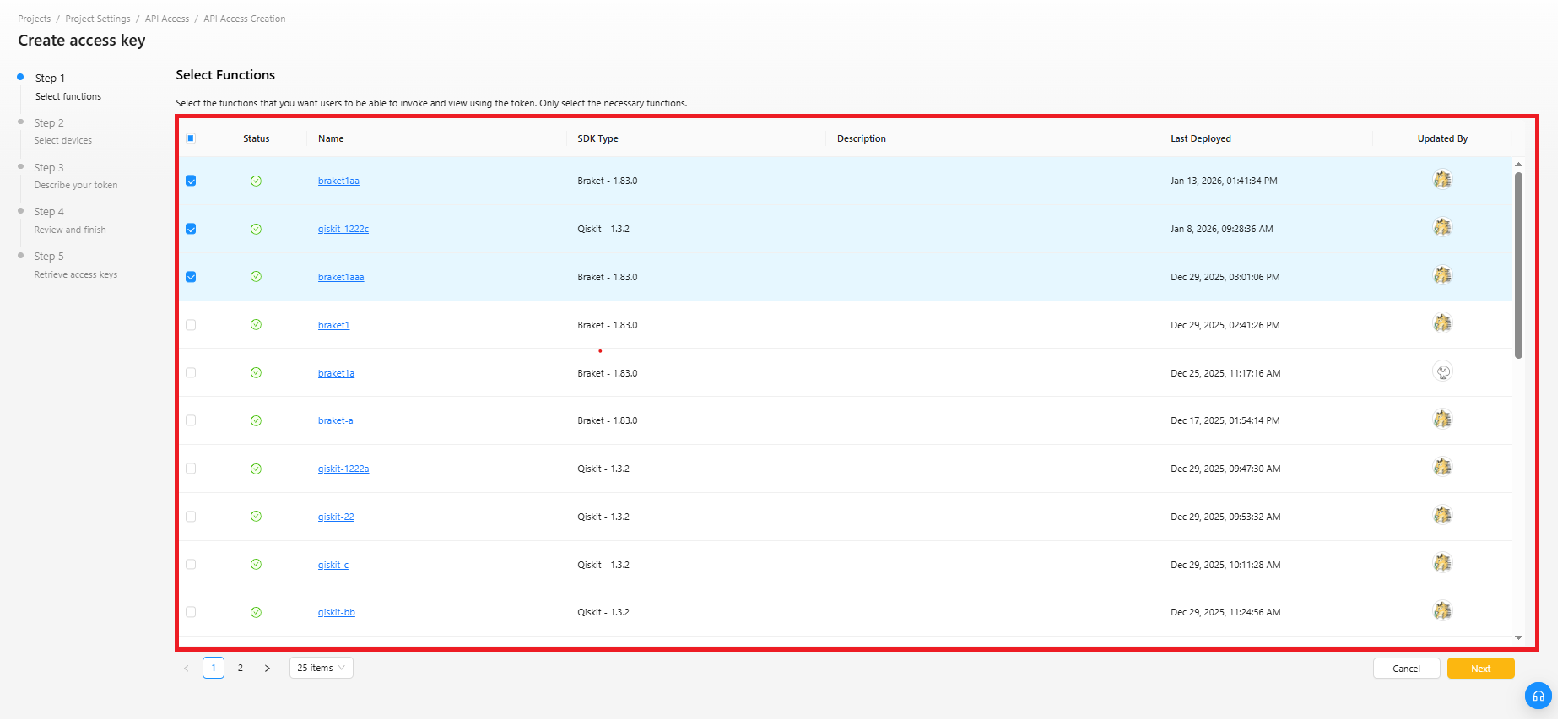
- 「アクセスキーを作成」は左側に表示されているとおり、この画面は複数ステップからなるプロセスの一部です。
ステップ1:ファンクションの選択
- ファンクションの選択:ファンクション一覧から、使用したいファンクションを1つ以上チェックボックスで選択します。
- 「次」をクリックします。
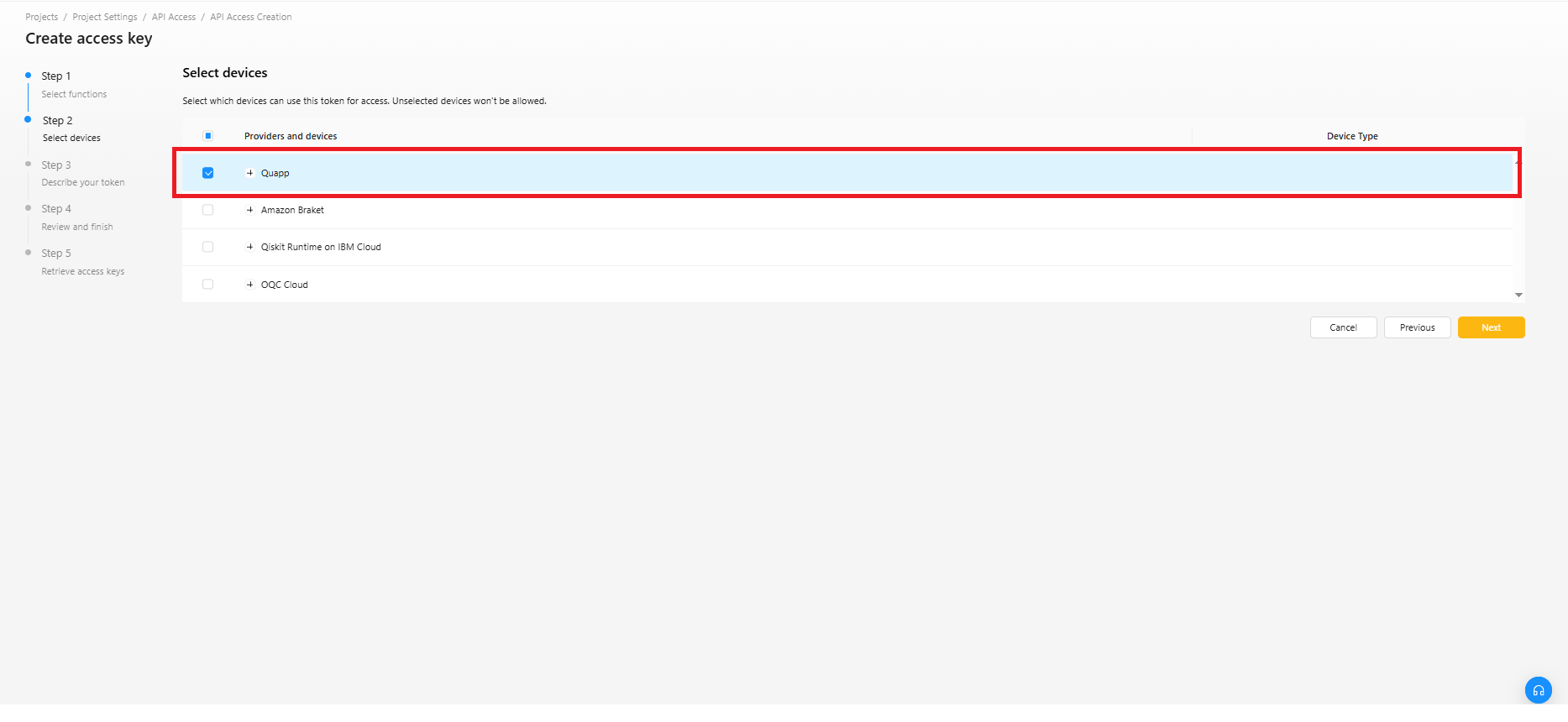
ステップ2:デバイスの選択
- デバイス一覧から、使用するデバイスを1つ以上チェックボックスで選択します。
- 「次」をクリックします。
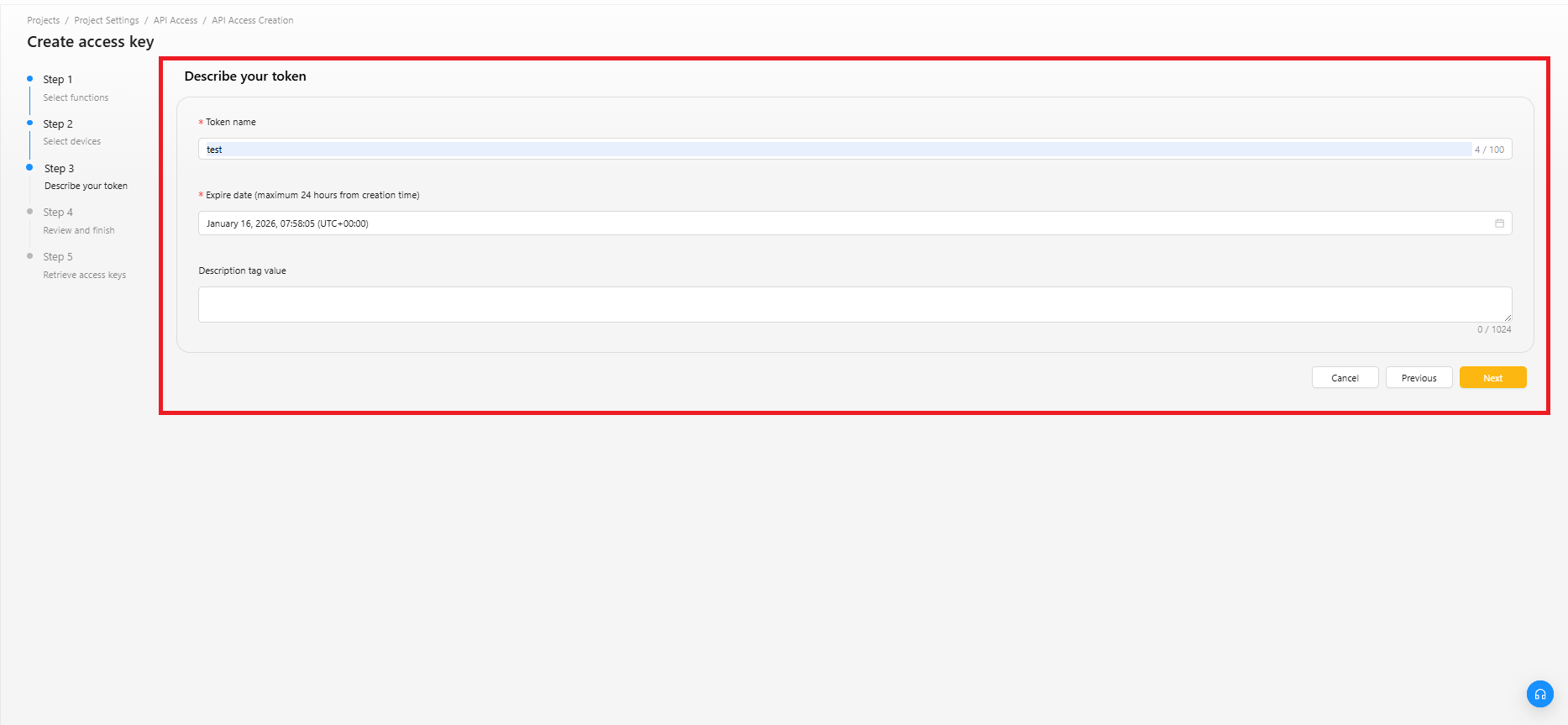
ステップ3:トークンの説明
トークン名:トークン名を入力します。
有効期限:トークンの有効期限を設定します。
説明タグの値 : このアクセストークンの用途や使用先を記載します。
明確な説明を記載しておくことで、後から安全にトークンをローテーションできます。
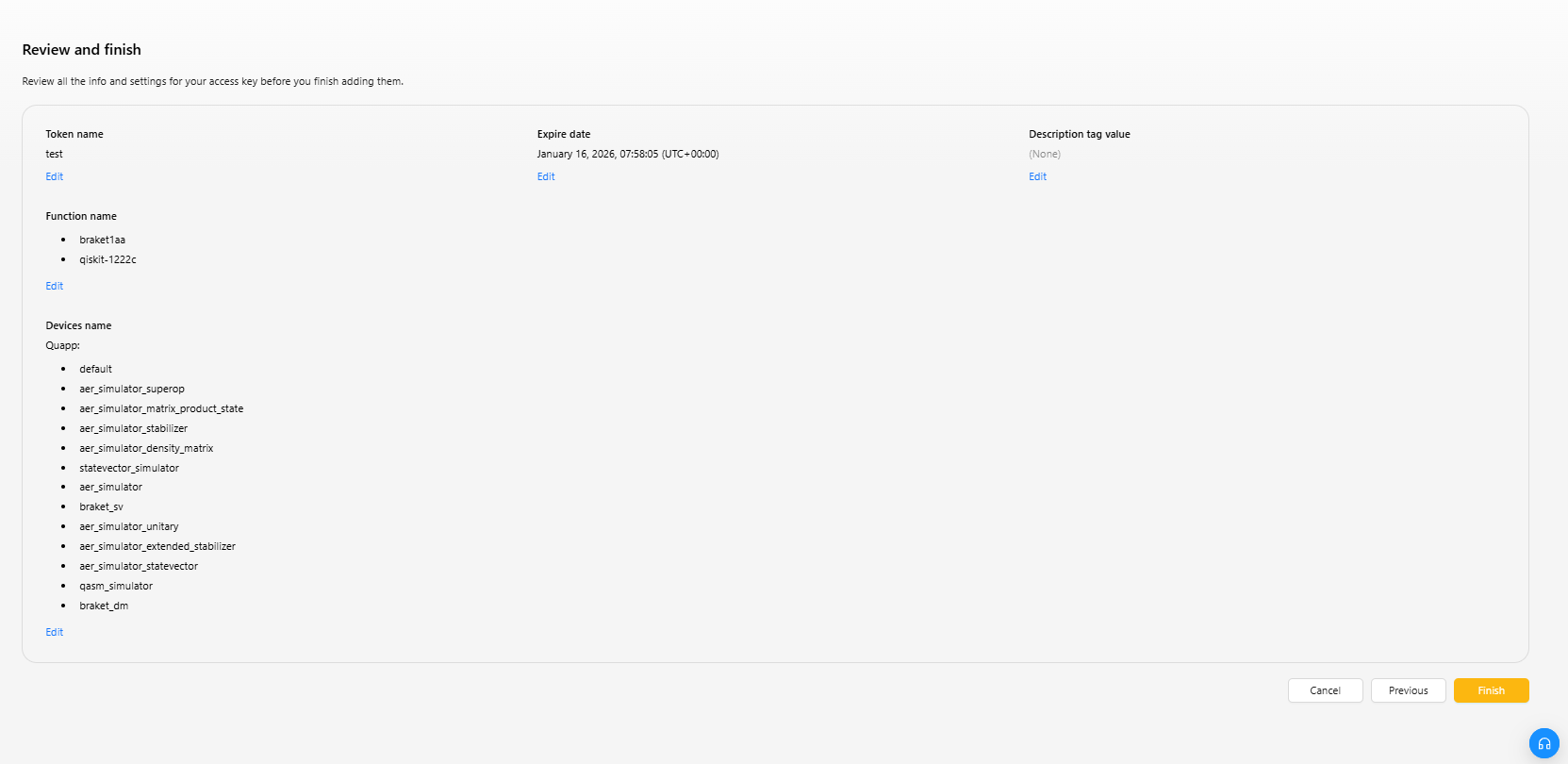
ステップ4:内容の確認
設定した情報および内容を確認し、問題がなければ作成を完了します。
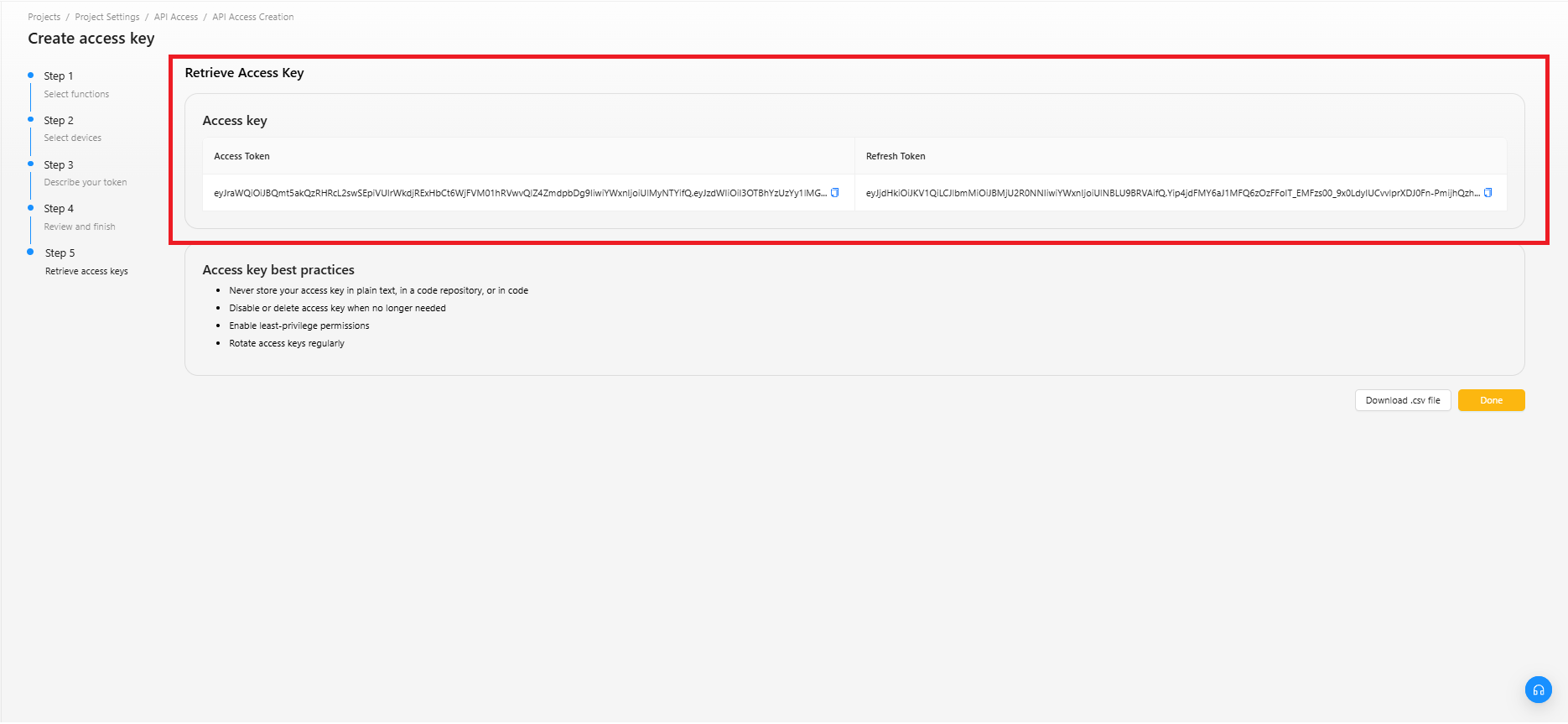
ステップ5:アクセス・トークンの取得
表示されているトークンをコピーし、安全な場所に保管してください。
トークンの値を確認できるのは、この画面のみです。
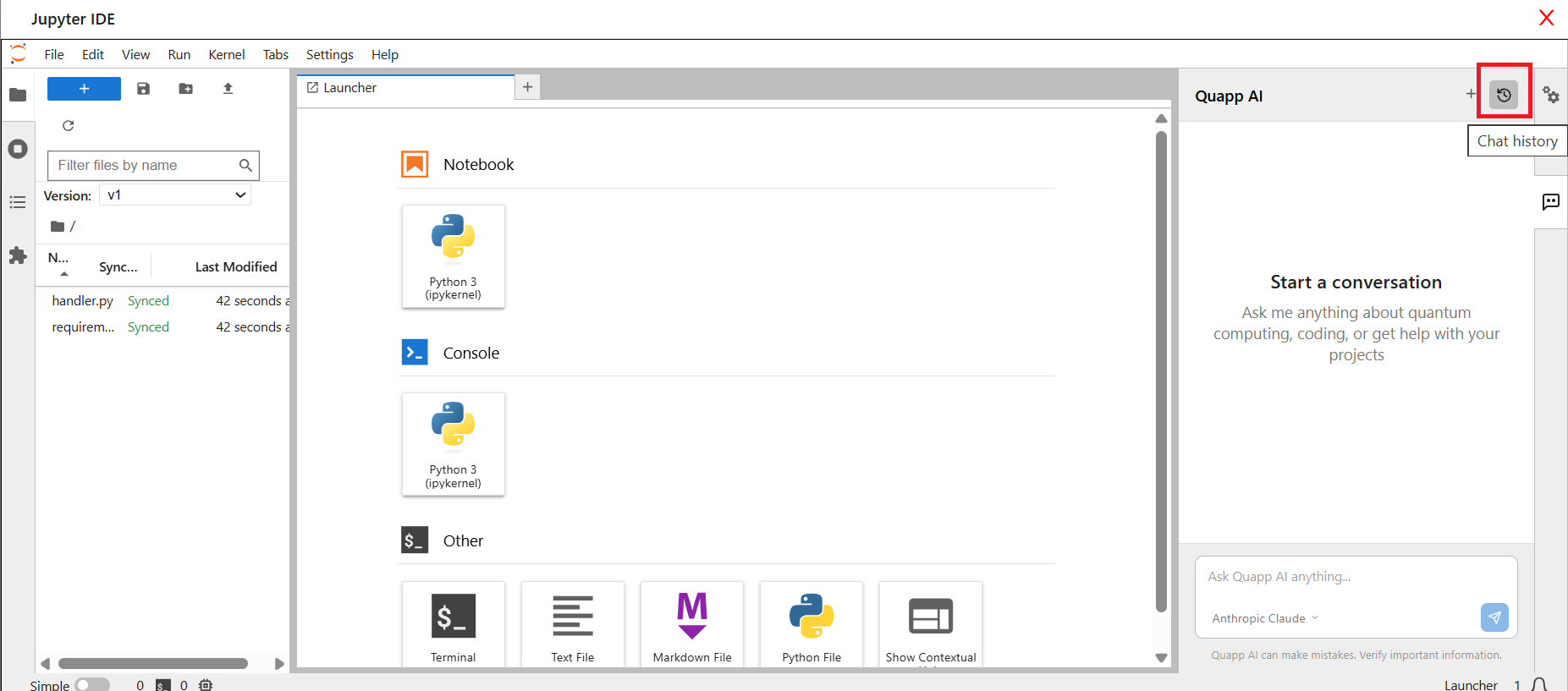
プロジェクトIDの取得方法
アカウントにログインします。
プロジェクトを選択します。
プロジェクト画面を開きます。
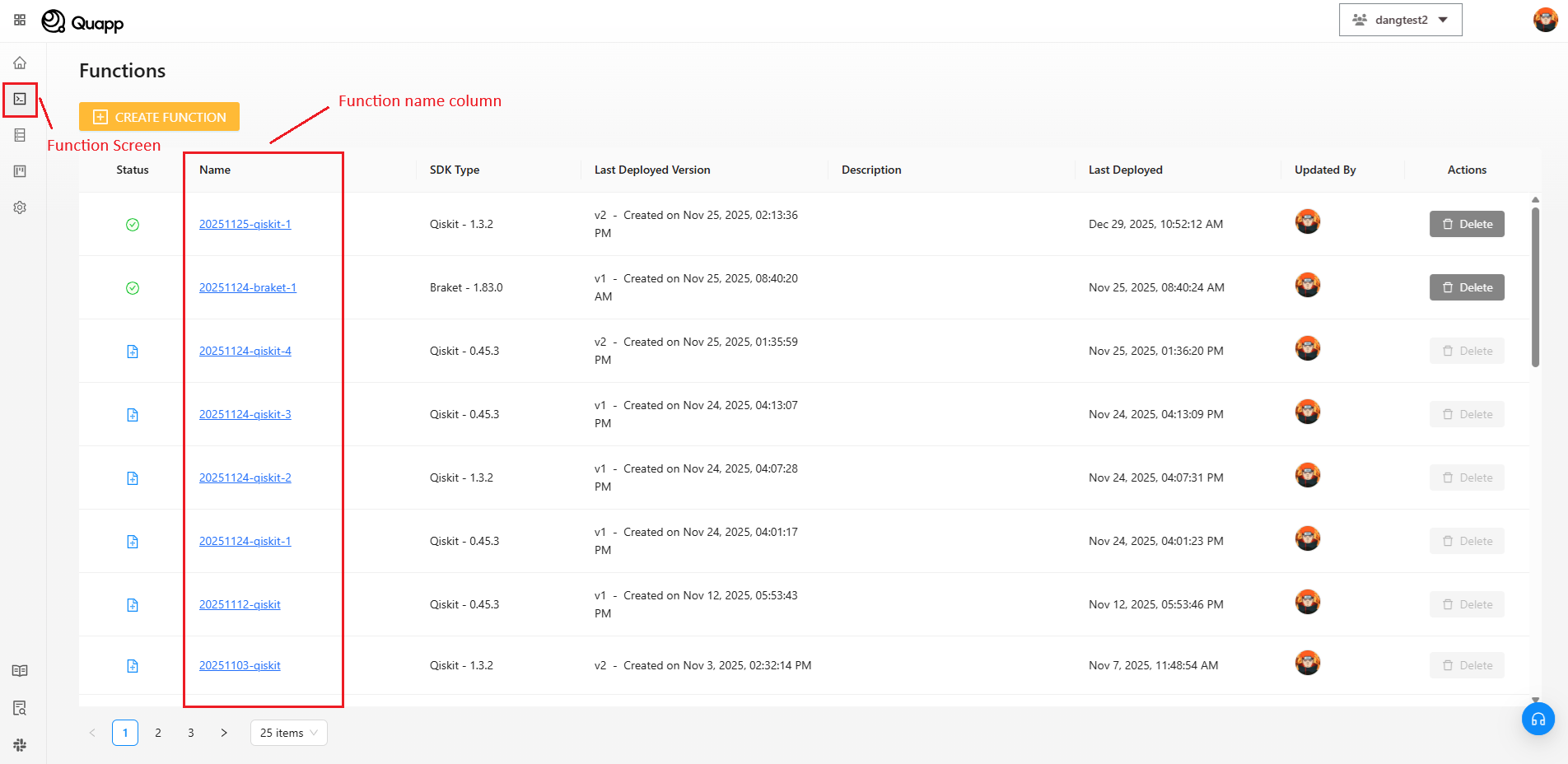
ファンクション名の取得方法
- アカウントにログインします。
- プロジェクトを選択します。
- ファンクション画面を開きます。
対象のファンクション名を一覧から確認できます。
デバイスID の取得方法
プロジェクト管理者 または プロジェクトオーナー権限が必要です。
権限がない場合は、プロジェクト管理者へお問い合わせください。
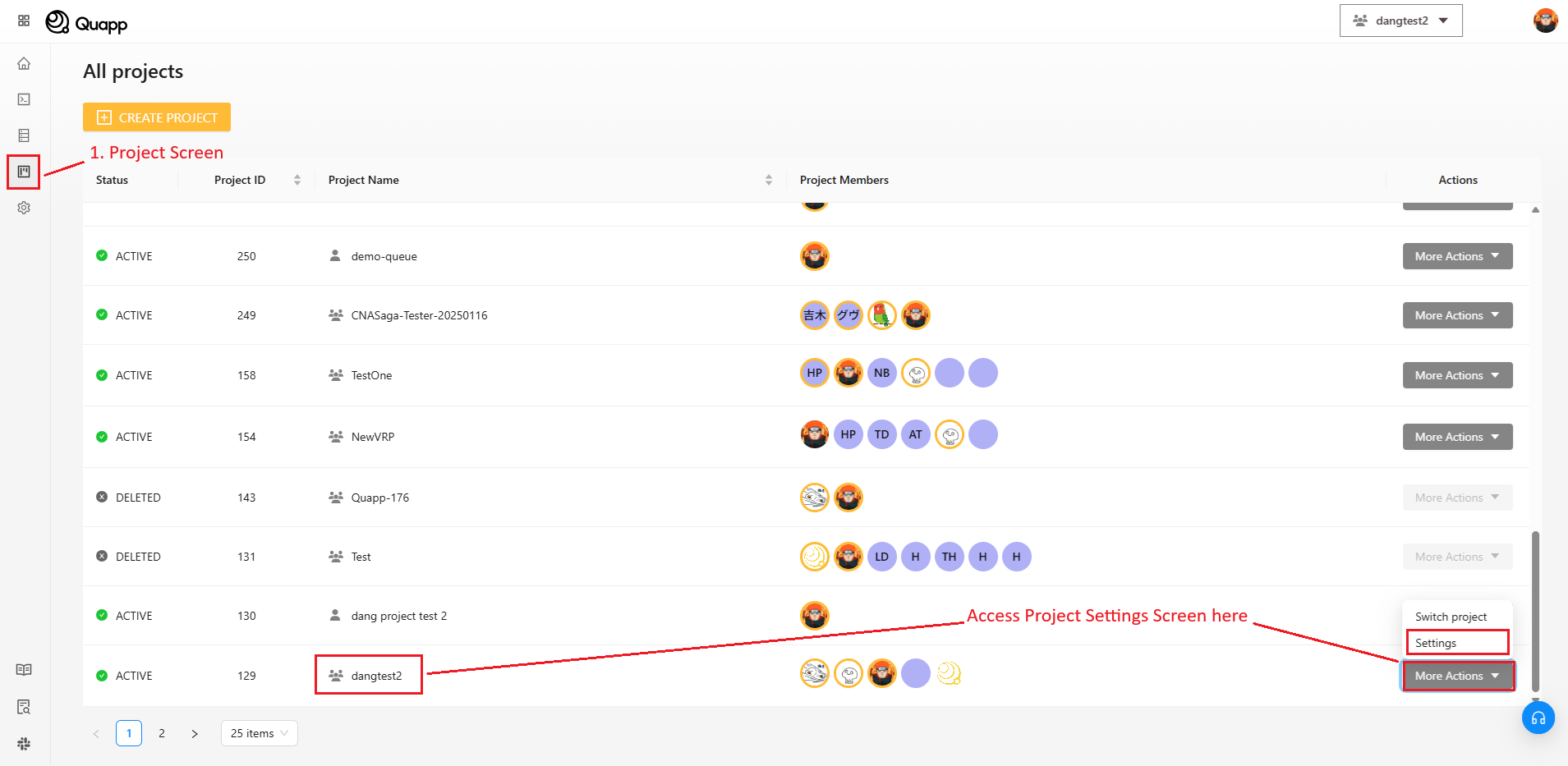
手順:
- アカウントにログイン → プロジェクトを選択 → プロジェクト画面へ移動
- 設定列で対象プロジェクトを選択 → その他の操作 → 設定
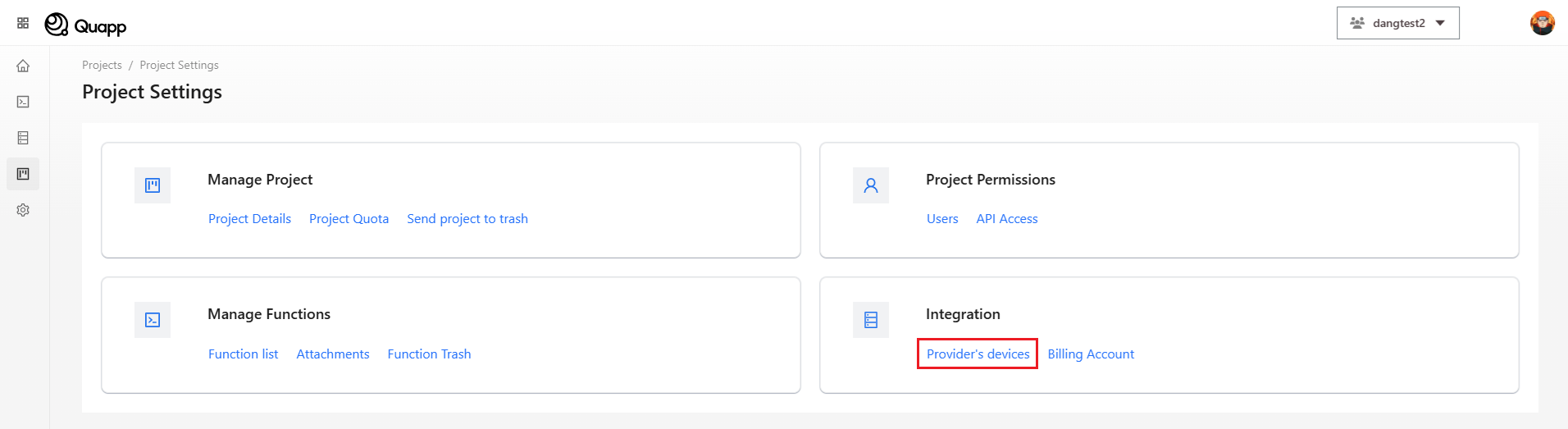
- プロジェクト設定画面で「プロバイダーのデバイス」を選択します。
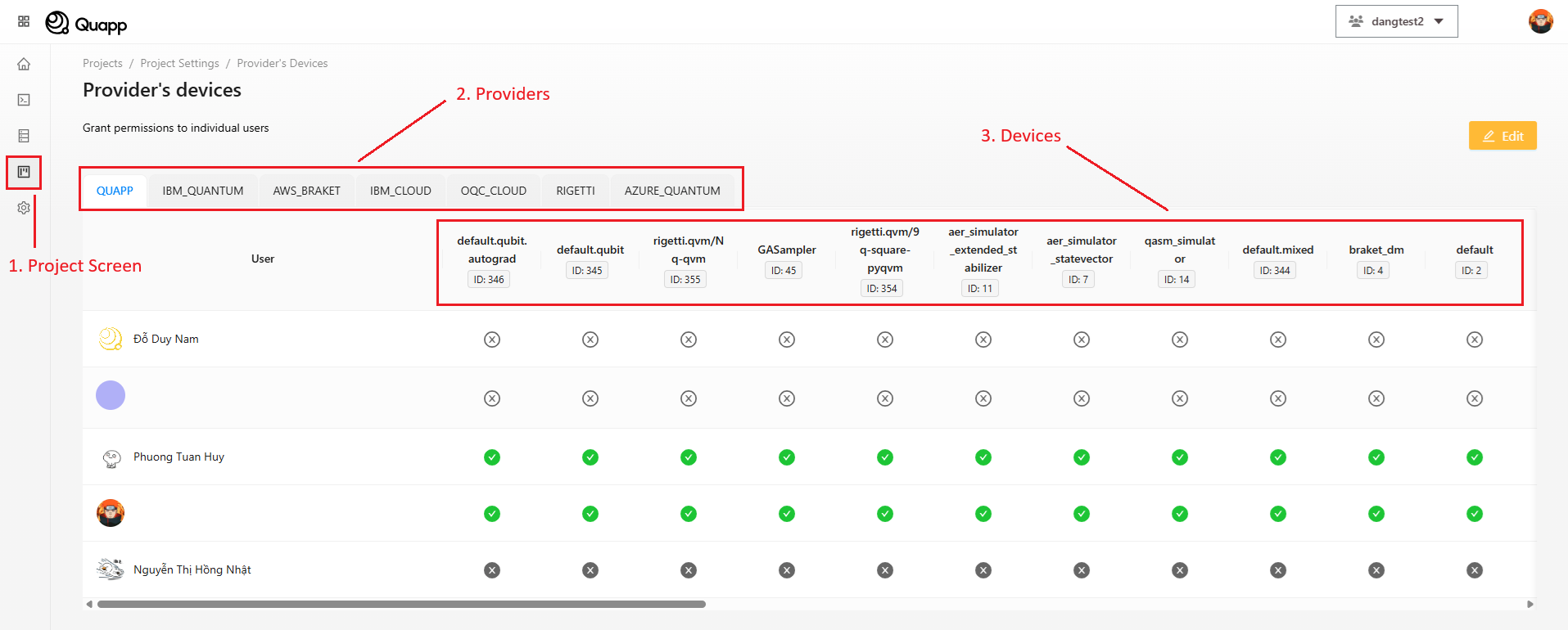
- 使用するプロバイダーを選択し、その下に表示されるデバイスIDを確認します。
アクセス・トークンを使用したファンクション実行方法
1. 実行エンドポイント
API: /api/v1/third-party/function/invoke
メソッド: POST
必須ヘッダー:
| 名前 | 値 |
|---|---|
| Authorization | Bearer <token> |
| X-Project-Id | <project ID> |
| X-Tenant-Id | <workspace ID> |
注意:
<workspace ID>の取得方法については、Customer Success までお問い合わせください。
ボディ
{
  "functionName": "string",
  "deviceId": 6,
  "description": "string"
  "shots": 10,
  "input": object
}
- ファンクション名:呼び出したいファンクション名
- デバイスのID:対象となるデバイスを一意に特定するためのID
- ショット:1つの回路で実行する回数
- インプット:入力データ
レスポンス:
{
    "timestamp": "2025-05-16T03:46:53.377798292Z",
    "route": "/api/v1/third-party/function/invoke",
    "data": "664b7e6b-1bae-4bae-bb1e-ea9a62271e08"
}
- データ:job_id。job_id を使用してジョブの詳細を取得します。
2. ジョブ詳細エンドポイント
API: /v1/third-party/jobs/{jobId}/detail
メソッド: GET
必須ヘッダー:
| 名前 | 値 |
|---|---|
| Authorization | Bearer <token> |
| X-Project-Id | <project ID> |
| X-Tenant-Id | <workspace ID> |
注意:
<workspace ID>の取得方法については、Customer Success までお問い合わせください。
パス変数:
- job_id: ジョブID
レスポンス:
{
    "timestamp": "",
    "route": "/api/v1/jobs/338650af-5e43-49f5-9ef5-809741b11cbf/detail",
    "data": {
        "id": "338650af-5e43-49f5-9ef5-809741b11cbf",
        "status": "DONE",
        "retry": 3,
        "description": "",
        "createdBy": {
            "id": 22,
            "email": "[email protected]",
            "fullName": "John Doe",
            "avatar": "http://example.com/avatar.png"
        },
        "updatedBy": {
            "id": 22,
            "email": "[email protected]",
            "fullName": "John Doe",
            "avatar": "http://example.com/avatar.png"
        },
        "submitTime": "2025-05-08T02:01:21.875362Z",
        "ranTimestamp": "2025-05-08T02:01:22.494423Z",
        "finishedTimestamp": "2025-05-08T02:01:32.535703Z",
        "device": {
            "id": 423,
            "name": "32q-qvm",
            "type": "QUANTUM_SIMULATOR"
        },
        "function": {
            "id": 824,
            "name": "test-pq",
            "version": 2
        },
        "jobInput": 1,
        "jobResult": {
            "ro": []

        },
        "provider": {
            "id": 5,
            "name": "Quapp"
        },
        "shots": 10,
        "totalCompletionTime": 10041,
        "circuitImageUrl": "http://example.com/avatar.png",
        "histogram": {
            "0": 6,
            "1": 4
        },
        "processor": "GPU",
        "circuitFileContentType": "image/svg+xml",
        "executionTime": 4243.2909,
        "isOwner": true
    }
}
トークンのライフサイクル
APIアクセス・トークンは、以下のライフサイクルを持ちます。
- プロジェクト管理者によって作成
- 外部クライアントからファンクション実行に使用
- (有効期限が設定されている場合)自動的に失効
- リフレッシュトークンを使用して更新
- 不要になった時点で失効
※ セキュリティ上の理由により、トークンの値は作成時に一度だけ表示されます。
API実行に必要な識別子
APIアクセス・トークンを使用してファンクションを実行するには、以下の情報が必要です。
- プロジェクトID:プロジェクトを識別
- ファンクション名:実行するファンクションを指定
- デバイスID:実行対象のデバイスを指定
これらの情報はQuapp UIおよび開発者向けツールから確認でき、Webアプリケーション上の表示と一致します。
APIによるファンクション実行
Quappは、APIアクセス・トークンを使用してファンクションを実行するための専用APIエンドポイントを提供しています。
リクエストには以下が含まれます。
Bearer Tokenによる認証
X-Project-Idによるプロジェクト指定ファンクション実行パラメータ
- ファンクション名
- 実行デバイス
- ショット数
- 入力データ(payload)
実行後、システムは即座にジョブID を返却します。
ジョブステータス参照
API 経由で実行されるジョブは、UI から送信されるジョブと同じステータスモデルに従います。
- NEW – 新規:ジョブは作成されましたが、まだ処理は開始されていません。
- INITIALIZING – 初期化中:ジョブを実行するために必要なリソースをシステムが初期化しています。
- IN_QUEUE – キュー待機中:ジョブは処理されるまでキューで待機しています。
- RUNNING – 実行中:ジョブは現在実行されています。
- DONE – 完了:ジョブは正常に完了しました。
- ERROR – エラー:ジョブの実行中にエラーが発生しました。
- IN_DEAD_LETTER_QUEUE – デッドレターキュー移動済み:ジョブが複数回失敗したため、デッドレターキューに移動されました。
この統一されたステータスモデルにより、UI および API の利用において一貫性が保たれます。
3. Postman を使用した呼び出し
- Postman を開き、トークンを追加します。
メソッドに POST を選択し、Quapp プラットフォームの invoke API エンドポイントを入力します。
次に Authorization タブ(①)を選択し、認証タイプとして Bearer Token(②)を選択します。
最後に、Bearer トークン(③)を入力します。
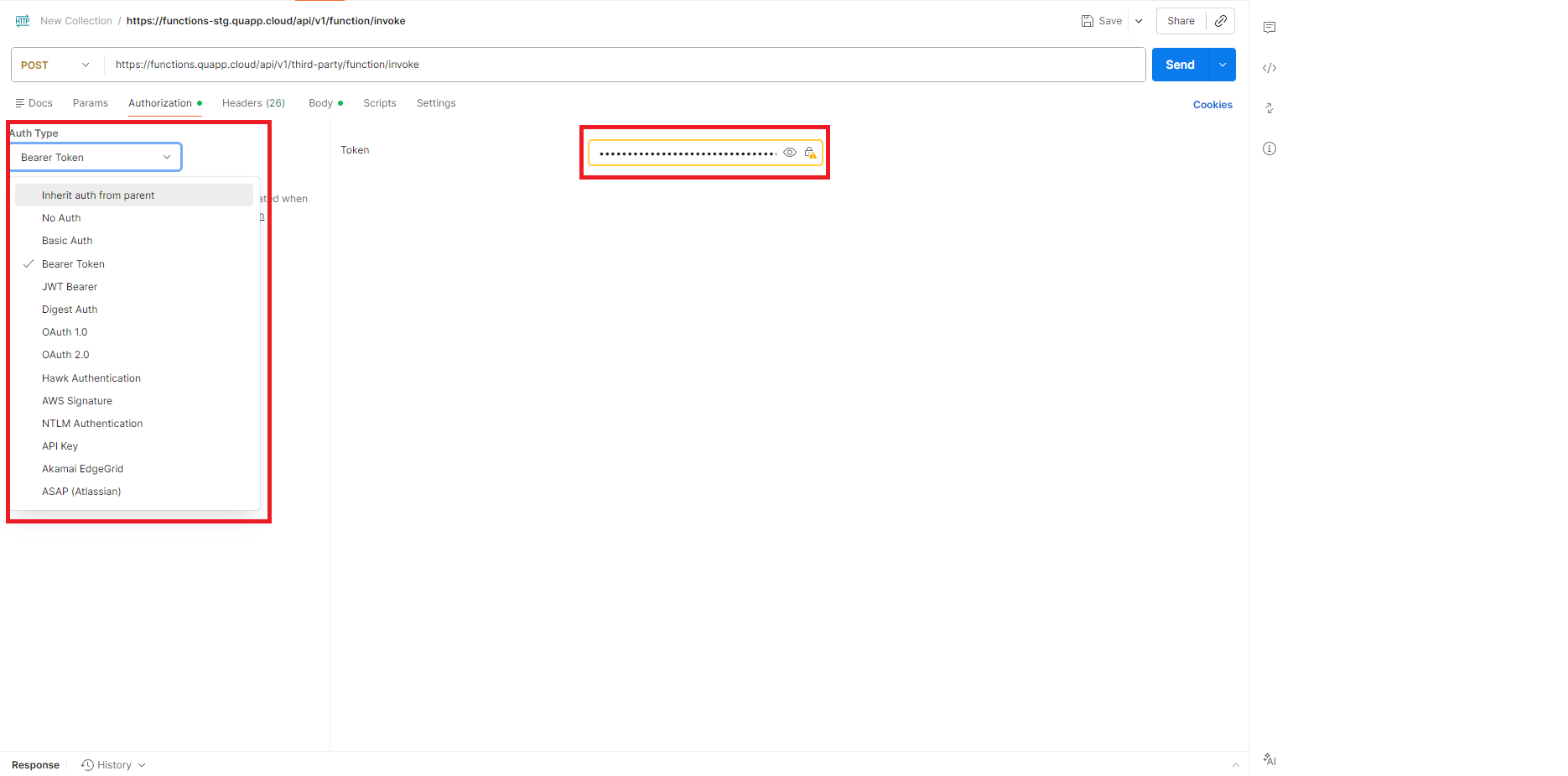
- ヘッダータブに切り替え、必須ヘッダーを追加します。
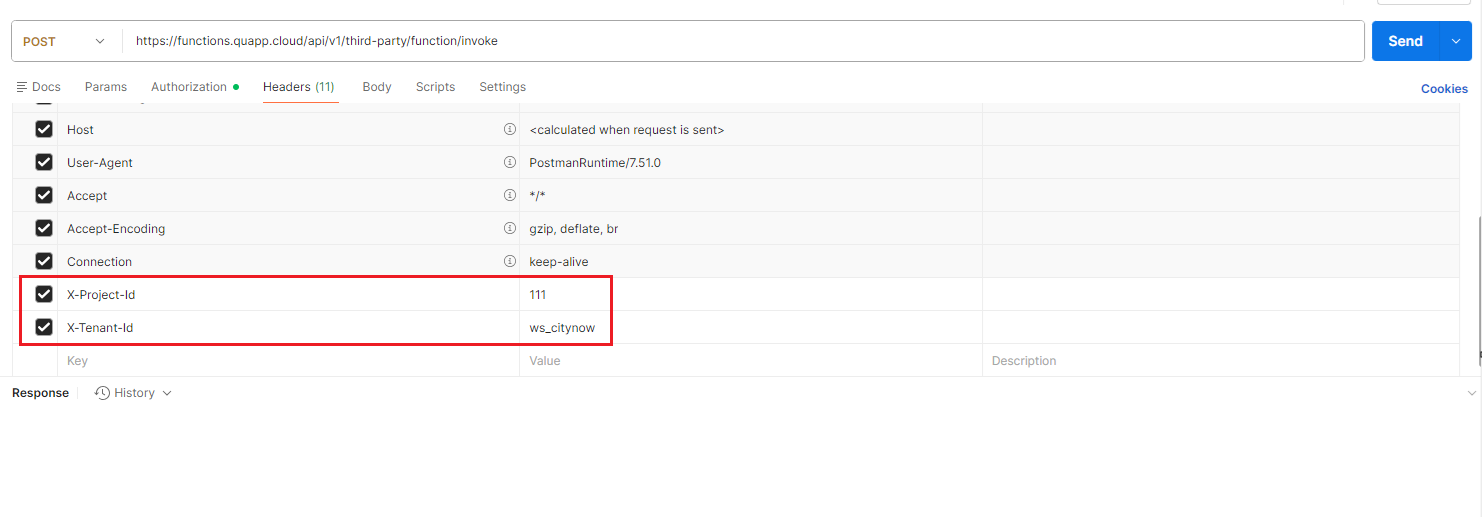
- ボディタブに切り替え、raw を選択し、リクエストデータを入力した後、リクエストを送信します。
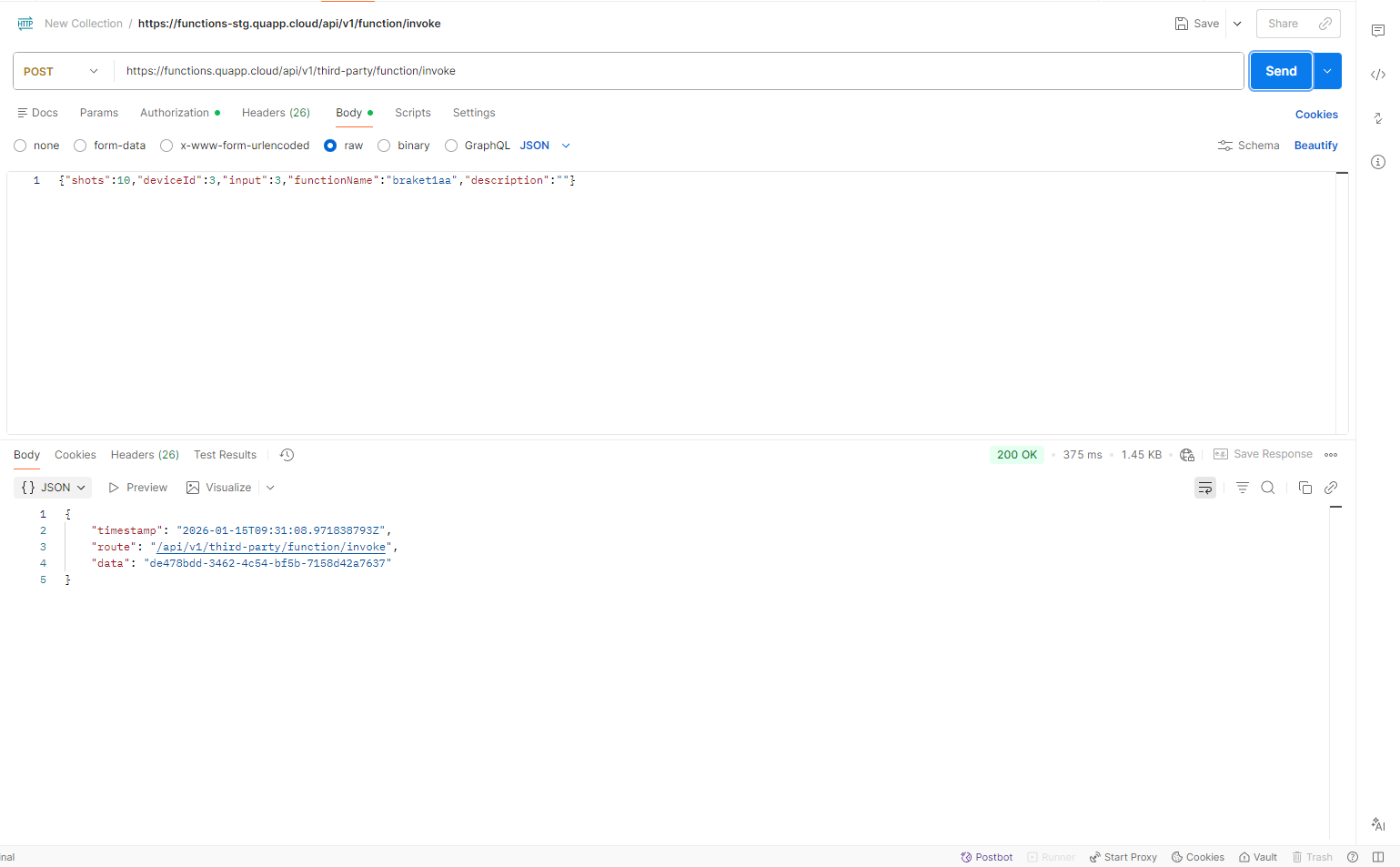
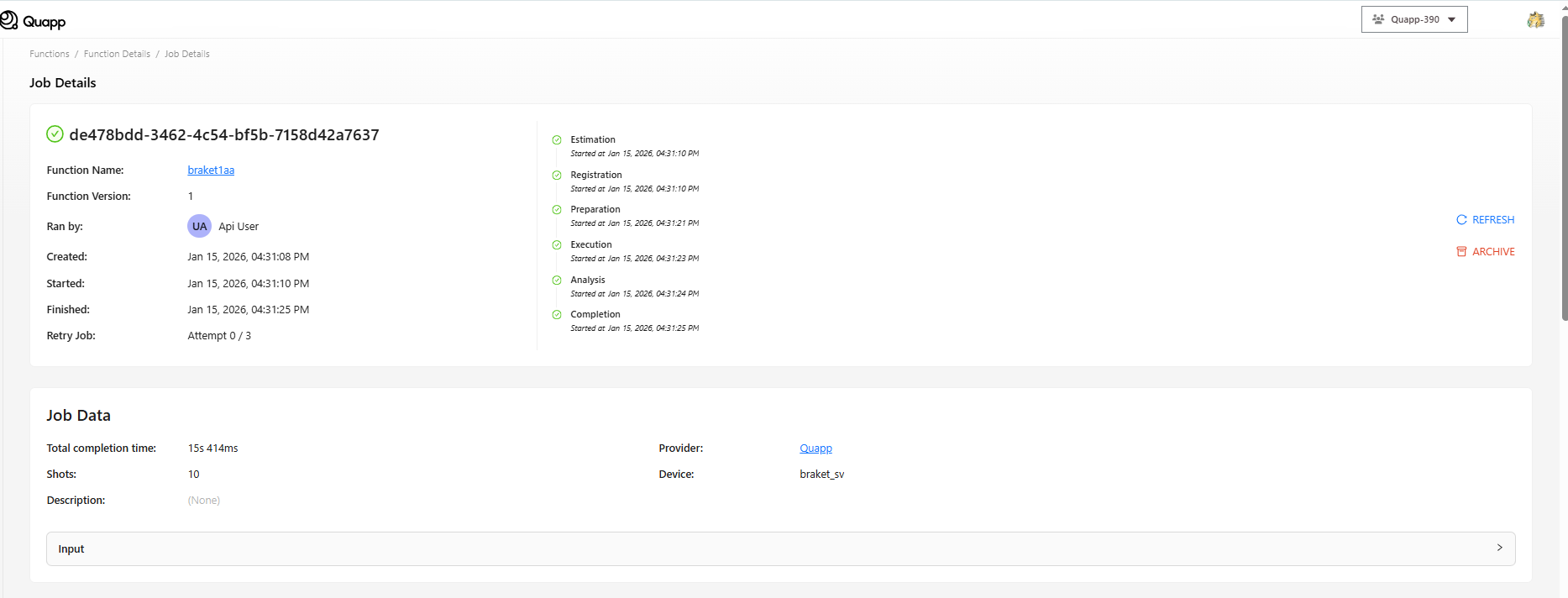
- ジョブ画面を更新して、先ほど実行したジョブを確認します。
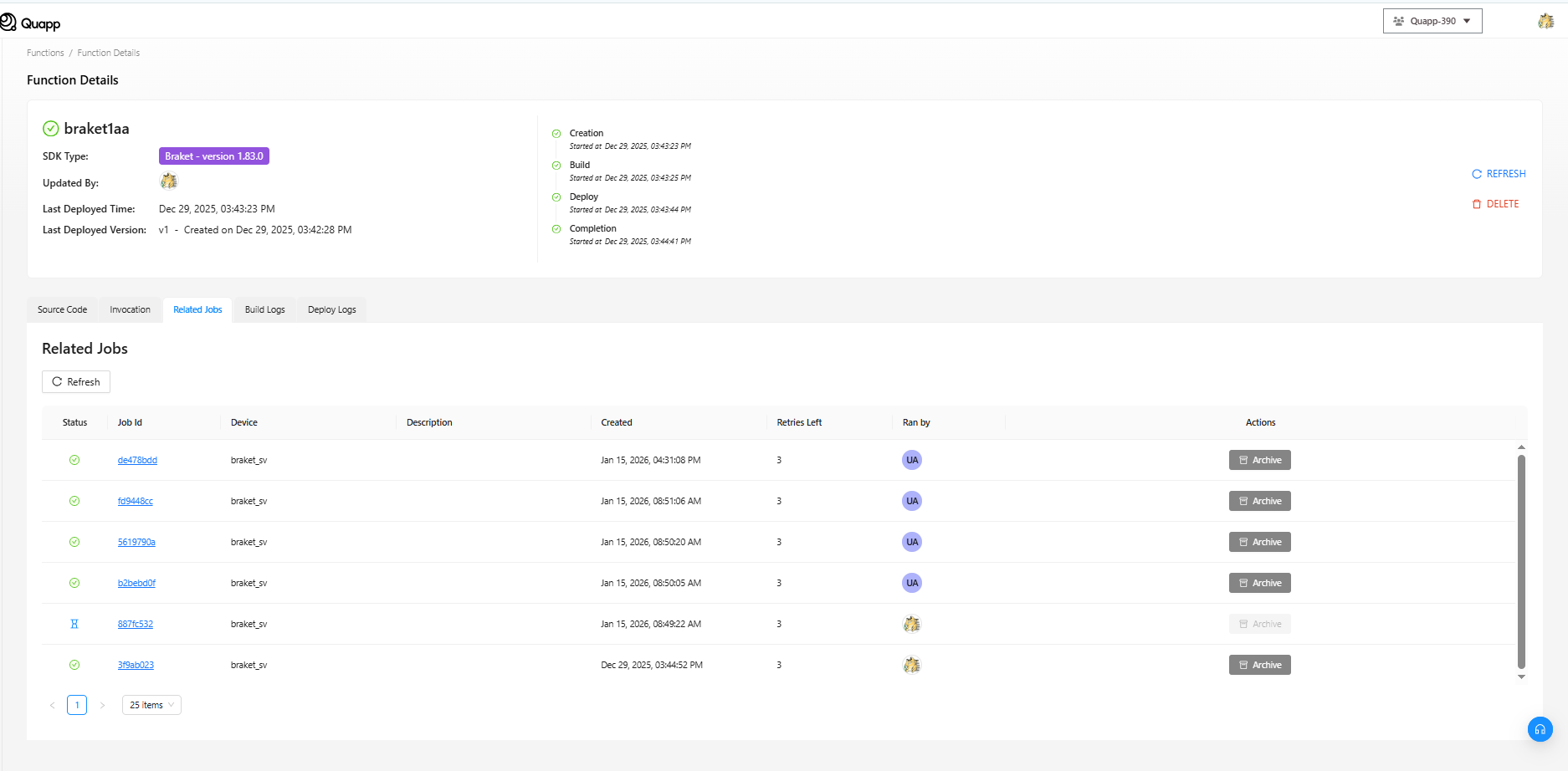
4. レート制限
現在、API 呼び出しのレート制限は 1 トークンあたり 10 秒間に 3 リクエストです。
この制限を超えた場合、API は以下のエラーを返します。
- HTTP ステータス:
429 Too Many Requests - レスポンスボディ:
{
    "timestamp": "2025-05-16T04:19:16.600818508Z",
    "route": "/api/v1/third-party/function/invoke",
    "errors": [
        {
            "code": "000013",
            "message": "Too many requests. Please try again later."
        }
    ]
}
クライアントは、スロットリングを回避するために、指数バックオフを用いたリトライ処理を実装する、またはレート制限を遵守する必要があります。
リフレッシュトークン利用ガイド
1. 目的
このエンドポイントは、現在のアクセストークンおよびIDトークンが期限切れ、または期限切れ間近の場合に、それらを更新するために使用されます。
クライアントはリフレッシュトークンを送信し、新しいトークンセットを取得します。
2. エンドポイント
POST /v2/tokens/refresh
説明: 有効なリフレッシュトークンを使用してトークンを更新します。
3. ヘッダー
| キー | 値 |
|---|---|
| Content-Type | application/json |
| Authorization | Not required |
4. リクエストボディ
{
  "refreshToken": "string"
}
説明:
- リフレッシュトークン:API アクセストークンを生成する際にユーザーが受け取るリフレッシュトークン文字列。
5. レスポンス例(200 OK)
{
  "downloadId": "string",
  "idToken": "string",
  "accessToken": "string",
  "tokenType": "string",
  "expiresIn": 0,
  "refreshToken": "string"
}
| フィールド | 説明 |
|---|---|
| アクセストークン_accessToken | API を呼び出すために使用される新しいトークン |
| トークンタイプ_tokenType | トークンの種類(例:Bearer) |
| 有効期限(秒)_expiresIn | アクセストークンが有効期限切れになるまでの秒数 |
| リフレッシュトークン_refreshToken | 新しく発行されたリフレッシュトークン(以前のトークンは置き換えられます) |
| IDトークン_idToken | 氏名、メールアドレス、ログイン時刻などの本人情報(クレーム)を含むトークン |
| ダウンロードID_downloadId | CSV ファイルをダウンロードするために使用される ID |
注意:このエンドポイントが呼び出されるたびに、新しいリフレッシュトークンが発行されます。
クライアントは、常に最新のリフレッシュトークンを保存する必要があります。
セキュリティのベストプラクティス
API アクセストークンを使用する際、Quapp では以下を推奨します。
- 必要な機能のみにトークンを割り当てる
- 可能な限り有効期限を設定する
- 定期的にトークンをローテーションする
- トークンを安全に保管する(環境変数またはシークレットマネージャーを使用)
- 使用されていない、または侵害されたトークンは直ちに無効化する
API アクセストークンを使用する場面
API アクセストークンは、以下の用途に適しています。
- 量子ファンクションを呼び出すバックエンドサービス
- 自動化されたワークフローやパイプライン
- 外部プラットフォームとの連携
- 量子ジョブのスケジュール実行やバッチ実行
これらは、エンドユーザーが対話的に利用するためのものではありません。
その場合は、引き続き Quapp の Web インターフェースを使用してください。