Project Permissions
Admin Role in Managing Projects and Members
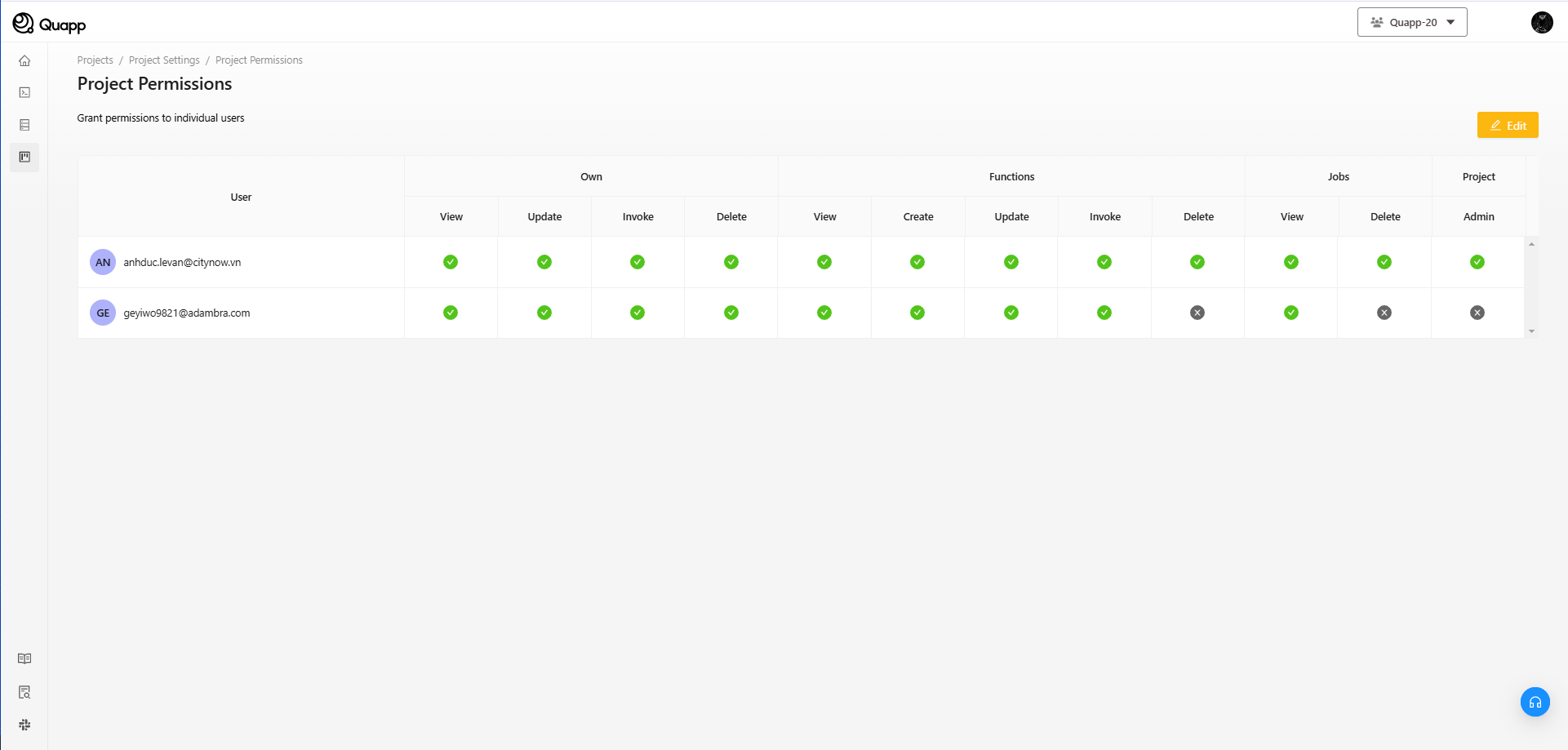
The Admin is the highest authority in the platform, with the following capabilities:
- Project Management: Admin can create, edit, or delete projects.
- Add or Remove Members: Admin can add or remove members from projects and change their permissions.
- Assign User Permissions: Admin can assign specific permissions to members within the project, such as the ability to create, edit, or delete functions, jobs, etc.
Member Permissions for Function Creation and Editing
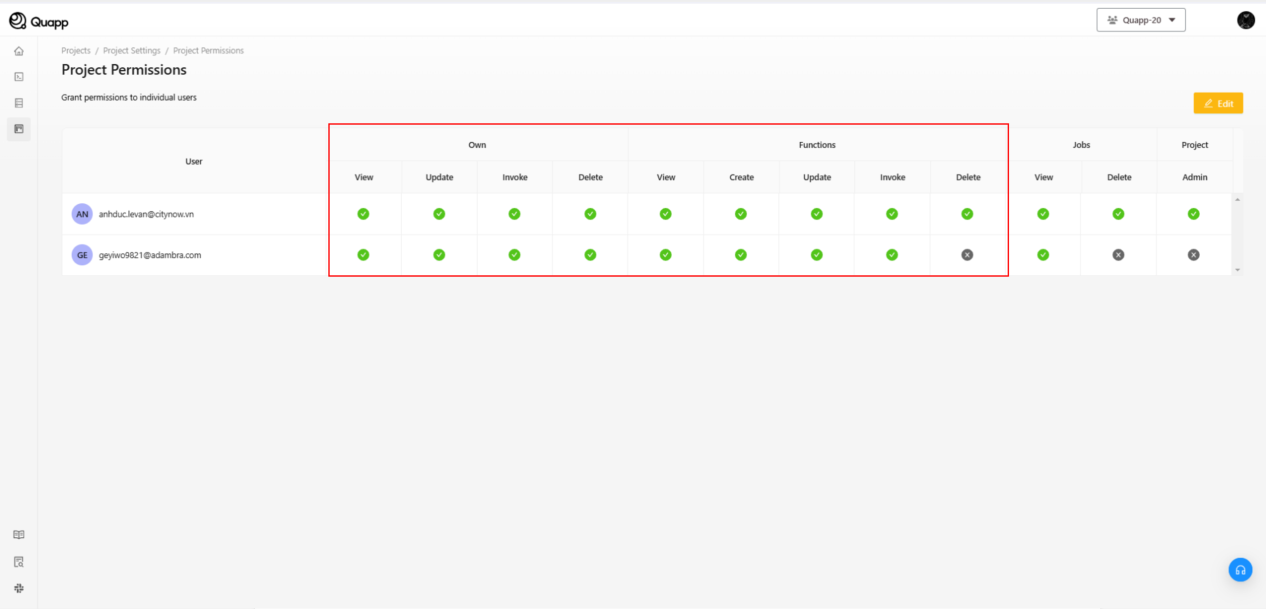
What a member can do depends on the permissions the Project Admin has granted. Members are not given every capability automatically:
- Create New Functions: Members can create new functions from pre-built templates or write their own code.
- Edit Functions: Members can edit existing functions, update code, or fix bugs.
- Deploy Functions: Members can deploy functions only when the Functions → Deploy permission has been granted to them. It is not part of the default permission set.
ℹ️ "Why can't I see the Deploy button?" A newly added member does not have the Functions → Deploy permission. The Deploy control is hidden or disabled until a Project Admin grants it. The same applies to Invoke and Delete.
Permissions for Job and Job History Management
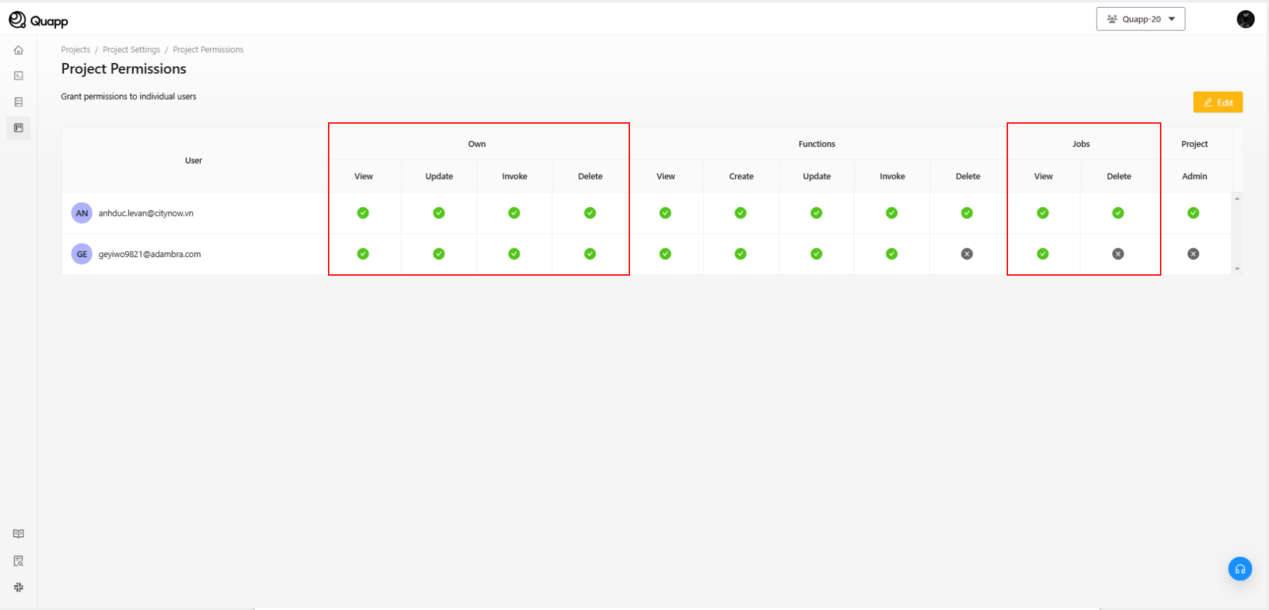
- Job Permissions: Admin can assign permissions for members to create and run jobs or limit them to only monitoring jobs.
- Job History: Both Admin and members can view the history of created jobs, their status (running, completed, failed), and related logs.
The Permission Matrix
Permissions are managed per member on Project Settings → Users. Each member has a matrix of 12 permissions across four groups:
| Group | Permissions | What it covers |
|---|---|---|
| Own | View, Update, Invoke, Delete | Operations on resources the member created themselves |
| Functions | View, Create, Deploy, Invoke, Delete | Operations on all functions in the project |
| Jobs | View, Delete | Viewing and deleting the project's jobs |
| Project | Admin | Full project administration, including access to every item in Project Settings |
Default permissions for a new member
When a member is added to a project they receive:
- All four Own permissions
- Functions → View
- Functions → Create
Everything else is off — including Functions → Deploy, Functions → Invoke, Functions → Delete, both Jobs permissions and Project → Admin. A Project Admin must grant those explicitly.
Granting and revoking permissions
- Go to Project Settings → Users and select Edit.
- Tick or untick the permission cells on the member's row. To grant a whole set at once, use the All checkbox on that member's row instead of ticking each cell. On Users it selects every Own, Functions, Jobs and Project permission for that member; on Provider's Devices it selects every device shown for that member. This row-level control is available on both screens.
- Select Save. A confirmation message appears when the change is applied.
Rules to be aware of
- A project must always keep at least one Project Admin. You cannot remove the last Project Admin, or revoke the Admin permission from them.
- A member who owns the project's Billing Account cannot be removed from the project.
- Missing permissions hide or disable the matching controls in the interface, rather than showing an error when they are used.