Provider’s Devices
A provider supplies quantum computing infrastructure. A device is one specific machine offered by that provider — either a simulator (quantum behaviour simulated on classical hardware; fast, and usually cheap or free) or a QPU (Quantum Processing Unit — real quantum hardware).
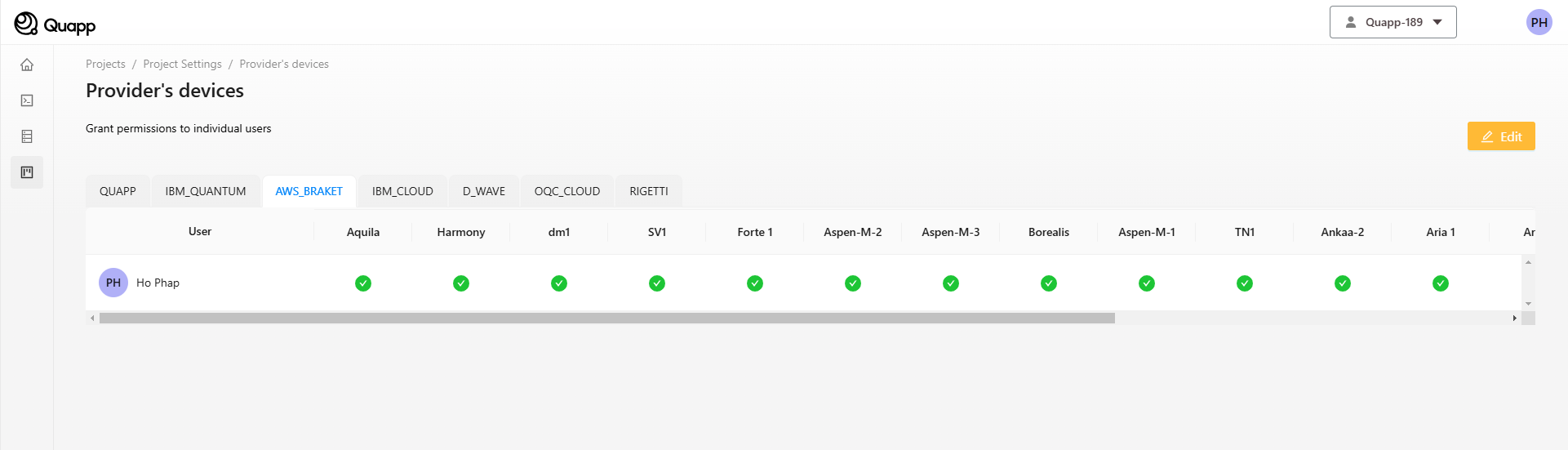
The Provider's Devices section shows the devices available under each provider and lets you manage which of them a project may use. Changes take effect immediately.
Opening Provider Details
- Select Providers in the sidebar.
- Select any provider to open its Provider Details page.
Quapp's own simulators run on CPU and on NVIDIA DGX V100 GPUs, so a simulator run does not have to wait for quantum hardware.
Providers integrated with Quapp
| Provider | Credential type | Example devices |
|---|---|---|
| QUAPP | Built in | Quapp's own simulators, on CPU and NVIDIA GPU — for example aer_simulator, statevector_simulator, default.qubit |
| AWS_BRAKET | Quapp credential | SV1, dm1, Aquila, Harmony, Forte 1 |
| IBM_CLOUD (Qiskit Runtime) | Workspace credential | ibm_torino, ibm_fez, ibm_marrakesh |
| D_WAVE | Workspace credential | Advantage_system4.1, hybrid BQM solver (quantum annealing) |
| OQC_CLOUD | Quapp credential | OQC Toshiko Tokyo-1, Lucy Simulator |
| RIGETTI | Quapp credential | Ankaa-3 |
| RIKEN | — | reimei, reimei-simulator, ibm_kobe |
| QUANDELA | Quapp credential | qpu:ascella, sim:belenos, sim:altair (photonic machines) |
| QUDORA | Quapp credential | Qudora devices |
| AZURE_QUANTUM | Workspace credential | Devices exposed by your Azure Quantum workspace |
| QUANTUM_HPC / Slurm | — | High-performance computing clusters |
The set of providers grows as Quapp integrates new hardware, and the devices under each provider change over time. The provider pages in the product always show the current list.
Credential type
Each provider carries a tag that tells you whether it is ready to use:
- Quapp credential — Quapp supplies the credentials. No setup is needed.
- Workspace credential — a Workspace Admin must register the workspace's own provider account before the provider can be used. See Workspace Provider Credentials.
Hovering over the tag explains the type. The same tag appears next to the provider name on the Provider Details page. The Quapp provider itself has no tag, because it needs no credentials.
Device permissions
The device permission matrix is organised into one tab per provider — QUAPP, AWS_BRAKET, IBM_CLOUD, D_WAVE, OQC_CLOUD, RIGETTI, RIKEN, QUANDELA, and further tabs such as AZURE_QUANTUM and QUANTUM_HPC where those providers are enabled. Open the tab for a provider to grant or revoke access to its individual devices.
To grant a member access to every device shown, use the All checkbox on that member's row rather than ticking each device. The same row-level control exists on Project Settings → Users for the permission matrix — see Project Permissions.
Related jobs
The Provider Details page lists every job in the project that ran on that provider, so you can see how a provider is actually being used without going function by function. Selecting a Job ID opens that job. See Managing and Tracking Job Results.
Device status
The Provider Details page shows the current status of each device, so you can check availability before submitting a job. The list of available devices is fetched fresh each time you open the page.
A device that is offline or at capacity will leave your job Queued for longer. See Job Queue.